


Batch History
The Batch History screen in the Burq Connector App allows users to view a summary of batches processed within a specific data flow (e.g., OrderCreate). This screen is crucial for tracking the number of successful, failed, or retried transactions in each batch, allowing users to monitor and troubleshoot the overall performance of data synchronization between ERP systems and e-commerce platforms.
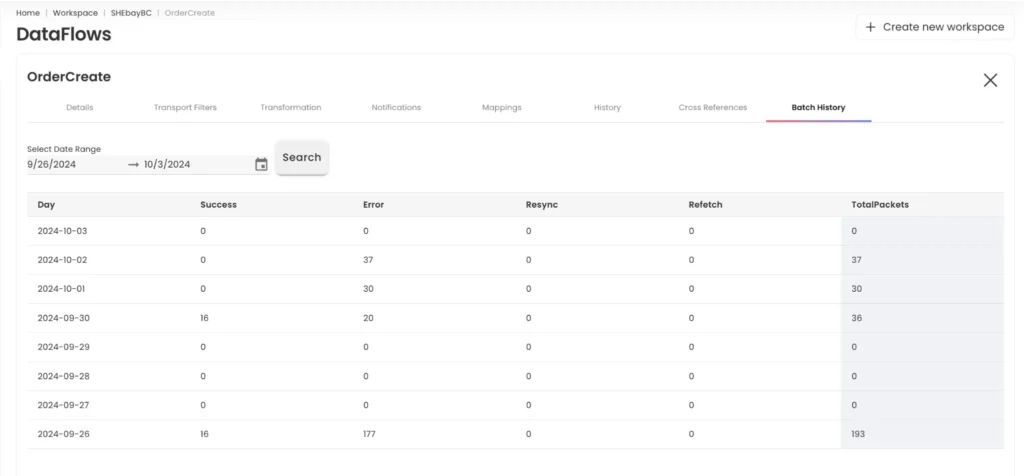
Key Features of the Batch History Page
Date Range Selection:
• Users can specify a Date Range to view the batch history for a selected period.
• The date range filter allows users to narrow down the batch history to a specific period for better monitoring and analysis of trends.
• After selecting the date range, clicking the Search button refreshes the view to show the relevant data.
Batch Summary Table:
• The main table displays a daily summary of processed batches during the selected date range. The columns in the table include:
• Day: The specific date when batches were processed.
• Success: The number of transactions successfully processed within that day.
• Error: The number of transactions that encountered errors.
• Resync: The number of transactions that were resynchronized during retries.
• Refetch: The number of transactions where a refetch request was made.
• Total Packets: The total number of data packets processed for that day.
Daily Overview:
Each row represents the daily summary of batch processing activity for the selected period. Users can quickly identify days with high numbers of errors or successful transactions, helping them spot trends or anomalies in the data flow.