From pre-built connectors to real-time monitoring and alerts, the BURQ integration platform brings all features in one secure platform.
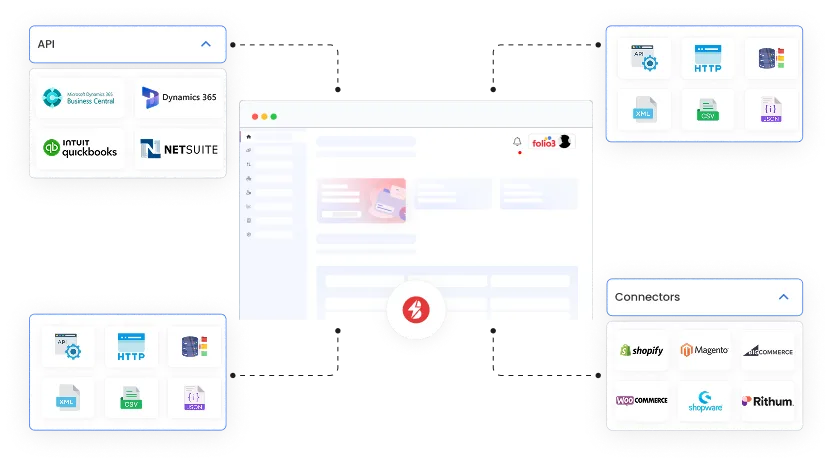















Discover how BURQ cloud-native iPaaS empowers teams to connect applications, automate workflows, and govern data flows with ease.
Create faster integrations with BURQ’s powerful set of connectors, supported protocols, and authentication methods.
BURQ provides a growing library of pre-built connectors that accelerate integration between business-critical systems. These connectors cover a wide range of domains, including:
eCommerce: Shopify, WooCommerce, BigCommerce, Magento, Walmart
Marketplaces & Logistics: Amazon, ChannelAdvisor, ShipStation, UPS
ERP & Accounting: Microsoft Dynamics 365, Business Central, QuickBooks
Data Services & Databases: SQL Server, JDBC/ODBC sources, MQTT
Each connector is designed to work out of the box with minimal setup. Configurations include ready-to-use authentication flows, transaction monitoring, and error handling.
By using BURQ’s connector framework, organizations can set up integrations that previously required weeks of engineering effort in just a few hours.
To further reduce time-to-value, BURQ includes pre-built connectors tailored for the most common integration scenarios. These come preloaded with mappings, transformations, and retry logic, allowing you to go live quickly while retaining full flexibility for customization.
Product synchronization between Shopify and Dynamics 365.
Order fulfillment tracking from eCommerce platforms into logistics systems.
Inventory and pricing updates across multiple sales channels.
Pre-built connectors ensure that integrations work immediately after configuration while remaining extendable to meet unique business requirements.
BURQ supports a wide range of protocols to ensure compatibility with both legacy and modern environments:
APIs: REST / SOAP
Real-Time: Webhooks
Messaging: MQTT
File Transfer: FTP / SFTP (with support for EDI flat files such as X12, EDIFACT, TRADACOMS)
Databases: JDBC / ODBC drivers (Oracle, MySQL, SQL Server, DB2, etc.)
Each connection can be tested in real-time before activation, ensuring reliable setups without guesswork.
To ensure secure connectivity, BURQ natively supports multiple authentication schemes:
OAuth 2.0
Basic Authentication
API Key Authentication
Query Parameters (via API configuration)
By supporting these widely adopted authentication standards, BURQ ensures seamless connections across enterprise systems.
Streamline workflows and control how and when data moves between systems.
In BURQ, DataFlows define the complete pathways through which information travels between systems, outlining the entire integration process from start to finish. A DataFlow governs how data is drawn from a source, transformed as needed, and delivered to its intended destination.
Along the way, DataFlows handle essential tasks such as:
Capturing incoming data from one or more endpoints.
Transforming and enriching the data to match the required formats.
Sending outgoing data reliably to the target system.
Validating exchanges to ensure accuracy and consistency.
In other words, DataFlows make sure the right data reaches the right system, in the right format, at the right time — providing structure and reliability for every integration.
BURQ includes a built-in scheduler that determines when DataFlows are executed. This scheduler, based on cron-like expressions, allows precise timing control:
Trigger flows can be set at 30 sec or every few minutes interval for near real-time sync.
Run overnight jobs for large-scale updates.
Configure weekly or monthly schedules for reporting data.
This gives businesses complete flexibility to align integration timings with operational needs.
Every message in BURQ follows a clear lifecycle, giving users full traceability and control at each stage of processing:
New: A new data entity is captured from the source system.
Processing: The message is actively being transformed and routed to its destination.
Finished: The transaction is completed successfully, and data has reached the target system.
Failed: Despite retries, the transaction could not be delivered and requires user intervention.
Skipped: Certain messages can be excluded automatically or manually based on defined business rules.
This lifecycle makes it easy to monitor, audit, and resolve integration issues, ensuring that no message is lost and every transaction is accounted for.
Modify data to fit the requirements of any connected system.
BURQ enables you to map data fields between systems, ensuring that incoming information matches the structure required by the destination. Through a simple interface, you can align fields like customer names, product SKUs, or order IDs without technical effort.
Beyond one-to-one mapping, BURQ lets you filter out unnecessary fields, preventing redundant data from entering the queue and improving efficiency. This ensures only clean, relevant data is passed along, ready for use in the target system.
When static mapping isn’t enough, BURQ enables calculated fields for dynamic value generation. With an expression builder, users can:
Concatenate multiple fields (e.g., first name + last name → full name).
Perform arithmetic operations (e.g., apply discounts, adjust tax values).
Add conditional logic (e.g., IF order_total > 500 THEN mark “High Value”).
Handle null values gracefully to avoid broken syncs.
These transformations ensure that data always arrives in the correct structure and format.
In addition to mappings and calculated fields, BURQ supports advanced transformations:
Filtering: Exclude irrelevant records before they enter the pipeline.
Lookup & Merge: Combine data from multiple sources, such as enriching orders with customer metadata.
Aggregation: Summarize or total values across datasets.
Validation: Enforce formatting and data-quality rules.
Together, these tools give users complete control over data shape and structure without writing custom code.
Protect workflows with enterprise-grade governance and fault tolerance.
BURQ includes resilience features that safeguard integrations:
Automatic Retry with configurable intervals, limits, and exclusions.
Kill Switch to halt flows if failure thresholds are exceeded.
Rate Limiting: Prevent overwhelming APIs by setting thresholds.
Circuit Breakers: Pause requests to unstable endpoints and retry after cooldown.
Fault Resyncing/Refetching: Allow failed messages to be reprocessed once the issue is fixed.
Priority Control: Handle high-priority data first to avoid bottlenecks.
These measures ensure no single failure disrupts the entire ecosystem.
Every time a DataFlow is modified, BURQ automatically creates a new version. This ensures:
Full history of changes.
Roll back to stable versions when needed.
Safer collaboration in multi-user environments.
These measures ensure no single failure disrupts the entire ecosystem.
BURQ provides role-based access control (RBAC) with three predefined roles:
Administrator – full platform access, including user management.
Basic – create and manage DataFlows, but no admin rights.
ReadOnly – view-only mode for audit and reporting.
This ensures operational safety while supporting collaboration.
Track system performance and transaction behavior across all integrations.
The dashboard gives real-time and historical insights into system performance, including:
Total processed transactions.
Throughput peaks.
Success/error ratios.
Trendlines showing dataflow health over time.
This provides a quick health check for both technical teams and business users.
Each DataFlow allows users to configure alerting rules:
Enable/disable error notifications.
Assign recipients for alerts.
Manage pending or bulk notifications.
This ensures teams can respond to issues without constant manual monitoring.
BURQ tracks all transactions chronologically, giving a detailed view into:
When each message was processed.
Type of action (success, failure, metadata creation).
Message details, transformations applied, and outcomes.
This provides complete traceability, ensuring accountability across workflows.
Security-first by design, with enterprise reliability.
BURQ provides a growing library of pre-built connectors that accelerate integration between business-critical systems. These connectors cover a wide range of domains, including:
TLS 1.2+ encryption for all data in transit.
Fine-grained RBAC for controlled access.
AES-256 encryption for data at rest.
Vault-based secret storage for credentials and tokens.
Sensitive data is never logged in plain text, reducing compliance risks.
BURQ is GDPR-ready and built with enterprise compliance in mind. Features include:
Containerized deployments.
Continuous vulnerability scanning.
Secure hosting on Microsoft Azure’s hardened cloud infrastructure.
Version-controlled DevOps pipeline with rollback options.
Sensitive data is never logged in plain text, reducing compliance risks.
BURQ provides around-the-clock engineering support for:
Incident response.
Workflow debugging.
Proactive monitoring.
This ensures business continuity without downtime.
By leveraging the marketplace, teams can integrate systems at scale with minimal setup effort.
Bring intelligence into your integrations with BURQ’s AI-powered features.
Simplify complex transformations by letting AI suggest field mappings automatically. Instead of manually aligning fields across systems, BURQ’s AI engine analyzes schemas and proposes the most likely matches, helping teams move faster with fewer errors.
BURQ extends monitoring with AI-driven insights that not only detect anomalies but also recommend corrective actions. Failed transactions can be automatically classified and flagged with suggested resolutions, reducing manual troubleshooting.
Easily integrate AI bots and agents into your workflows. Whether it’s an AI chatbot for customer support or an intelligent assistant for supply chain forecasting, BURQ allows you to orchestrate human, system, and AI-driven processes within the same platform.
BURQ makes integration accessible to everyone with its natural language builder. Simply describe your integration in plain English, for example, “Sync new orders from Shopify into Dynamics 365 every hour”, and BURQ automatically generates the DataFlow configuration.

BURQ is certified for ISO 27001, the leading global standard for information security.

BURQ extends its security framework with ISO 27701 certification, ensuring robust privacy information management.

BURQ follows all GDPR standards to safeguard personal data and support global compliance requirements.



Real Results, Real Impact
Burq iPaaS integration of AX 2012 and Shopify enabled real-time data exchange, driving 2x growth.
We're helping Maurten integrate their ERP with Amazon stores across the UK and Germany.
Discover how BURQ automated Greenlane's processes, streamlined inventory and pricing management.
Find out how we increased operational efficiency for Ellison by 80% by integrating Shopify & Dynamics Nav.
See how Jura Inc. transformed retail & distribution operations by integrating Magento with D365 BC.

Sept 26, 2024
We were able to seamlessly integrate two versions of Microsoft NAV with two Shopify stores and two 3PL partners. As a result, orders now flow in and out of our...


May 30, 2024
We eventually decided to go with Burq and we have no regrets. The system is seamless and works in the background 99% of times. Exceptions are captured and easy to deal with.

Aug 23, 2024
We are using the portal active to monitor transfer between our ERP and our Sales system. The logging function is good, and we are using it to better understand the processes.

Jun 04, 2024
We have been using Burg for a few years now. Solid, stable integration solution between our websites and ERP. Support has also been great.
Mar 27, 2024
Flexibility. Scalability. Support.Nothing but the praise for a product and Folio3 Team that implemented it.

Dec 17, 2024
The system's dashboard is user-friendly, offering ample customization options to tailor configurations and features to our specific needs.
Mar 27, 2024
Flexibility. Scalability. Support. Nothing but the praise for a product and Folio3 Team that implemented it.
Dec 17, 2024
The system's dashboard is user-friendly, offering ample customization options to tailor configurations and features to our specific needs.
Get in touch for more information and clarifications