Have you ever thought about what happens when the software running your entire business suddenly feels outdated? Or have you felt it is too slow to keep up with the demands today? Do you feel the need for a change? If that is so, then you must know that you are moving towards legacy system migration. If you want to stay competitive and efficient, then this is an essential process that you must go through in 2025. In this blog, we will go through the intricacies and tell you everything you need to know about legacy system migration, why you need it, and how to approach it like an expert!
What Is a Legacy System?
A legacy system is any outdated software, hardware, or technology that is still being used even though newer solutions are out there. These systems were usually built decades ago with the technology and catered to the business needs of that time. They are critical for business operations, but due to the changes that come with time in business operations and the market, they can be inflexible, costly to maintain, and difficult to integrate with modern tools.
For example, you might still have an old mainframe system that is managing all your financial transactions or an obsolete inventory system that does not communicate with your newer platforms.
Legacy systems often run on operating systems that are not supported anymore or use programming languages that only a few developers know now. These limitations make troubleshooting and upgrading an impossible task. Yet, many businesses rely on them because they have been working, at least for now.
Examples and Common Traits
You can find legacy systems in many industries, from banking to manufacturing. Their common traits include:
- They are running on obsolete hardware and software platforms
- There is Limited or no support from the original vendors
- Poor integration with new systems
- The maintenance costs are very high
- Many security vulnerabilities due to a lack of updates that handle the threats of today
These issues make legacy systems a major concern for businesses these days that want to innovate or scale.
When Does a System Become Legacy?
So, how can you know when it happened? A system becomes “legacy” not just because it is old, but rather when it no longer fulfills your current business needs effectively. This can happen when:
- The vendor stops supporting the system
- The system can no longer handle new regulatory requirements
- It is not compatible with newer technologies
- It hampers operational efficiency or lowers user experience
If these issues arise, then it is time for you to think about migrating or modernizing your system.
Why Migrate Legacy Systems in 2025?
Why now in 2025? Why must you not delay anymore and go ahead? Well, migrating legacy systems is increasingly important now because business environments have become more competitive and technology-driven than ever before. And sticking to outdated systems can hold your business back in many ways.
Key Drivers: Security, Compliance, Innovation
Security is a top driver behind the need to migrate. Legacy systems usually run outdated software that is no longer receiving security patches. This makes your business vulnerable to modern cyberattacks. Another concern is compliance; new data protection laws require systems that can facilitate audits, accurate reporting, and secure handling of sensitive data. Lastly, there is innovation. To compete in the highly competitive environment, you must embrace new digital tools like AI, IoT, or cloud computing, which old systems simply can not support.
Migrating legacy systems lets you protect your data, adhere to compliance requirements, and explore new business potential.
Risks of Delaying Migration
You are exposing your business to a myriad of risks if you delay migration. Besides security breaches and compliance failures, your legacy systems can start failing when you expect it the least! This can result in costly downtime. Integration with new systems can become harder and expensive, and skilled staff that is experts with old technologies can be hard to find. Over time, these issues can deter your operations and slow your business growth, and damage the reputation that you took ages to build.
7 Main Types of Legacy System Migration
When you plan your legacy system migration strategy, you must be aware of the different approaches that you can adopt. Each strategy comes with its pros, cons, and use cases.

1. Rehost (Lift and Shift)
The Rehost approach moves your existing system “as-is” to a new environment, which is usually the cloud. This is the quickest and least expensive way to get rid of old hardware, but it does not modernize the application itself. You can think of it as shifting your existing system to new soil, but without changing the roots.
2. Replatform (Lift, Tinker, and Shift)
Replatforming is a technique in which you make small optimizations, such as updating middleware or databases, before moving the system. The advantage is that this boosts your performance and cloud compatibility but without a complete rewrite.
3. Repurchase (Drop and Shop)
In this approach, you replace your legacy system with an off-the-shelf product that is available commercially. This is a good move when your old system no longer fits your business model, and you quickly want to have modern features. But on the flip side, it might require you to change some business processes.
4. Refactor (Re-Architect)
Refactoring involves restructuring your application code to enhance the flexibility and performance of your system. This method is more time-consuming but gives you systems that are easier to maintain and scale.
5. Rebuild (Redesign)
Rebuilding means developing a new system from scratch that matches your current needs. It provides the most flexibility but also demands a lot of time, money, and involves immense risk.
6. Retire
If you do not require a system anymore, then retiring it can reduce maintenance costs and make your IT environment fairly simple. If you are going ahead with this method, then make sure to archive important data and transition users carefully.
7. Retain
Sometimes, keeping a legacy system as-is is the practical choice, especially if migration risks outweigh the current benefits. This is usually a temporary solution while you prepare for future migration.
Legacy System Migration Process
Migrating legacy systems mandates a clear, step-by-step process so that there are minimal risks and maximum benefits.
Assessment & Business Case
You must begin by evaluating your current systems. You must identify what works, what does not, and the risks that you are facing. Observe elements such as performance, security, compliance, integration, and user feedback. This in-depth assessment will help you build a solid business case that reflects the value your migration will bring. The returns can be many, including cost savings, risk reduction, or increased agility. The business case is your roadmap and justification for the investment you will make.
Strategy, Tooling & Execution
After you are done assessing, move on to develop your migration strategy. Select the right migration approach (from the 7 Rs), set clear goals, and pick the right tools to help with data migration from legacy systems and integration. The execution process consists of careful scheduling to reduce your downtime, exhaustive testing, and involving all stakeholders from IT, business, and end users. In addition, communication and training plans will minimize resistance from the users and lead to a smoother transition.
Common Challenges and How to Overcome Them
Like any action that you take, legacy system migration comes with its own set of challenges. But knowing these ahead of time helps you plan better and have a proactive approach.
Downtime
You want to avoid business disruption during migration. Then you must plan migrations during your low activity periods. Moreover, wherever possible, use phased or parallel migration techniques, and use automated tools that will speed up processes and reduce errors.
Data Loss
It is critical to protect your. You must always back up your data multiple times and at multiple locations before migration. You can use automated tools that validate and reconcile data to identify any inconsistencies.
Resistance to Change
Change is hard and can be difficult to accept for your teams that are accustomed to old systems. You must engage users from an early phase, clearly explain the benefits, and provide them with hands-on training and support. Being transparent will help you gain their trust.
Tools and Platforms for Migration
The right tools can make all the difference in migrating legacy systems. Here are a few:
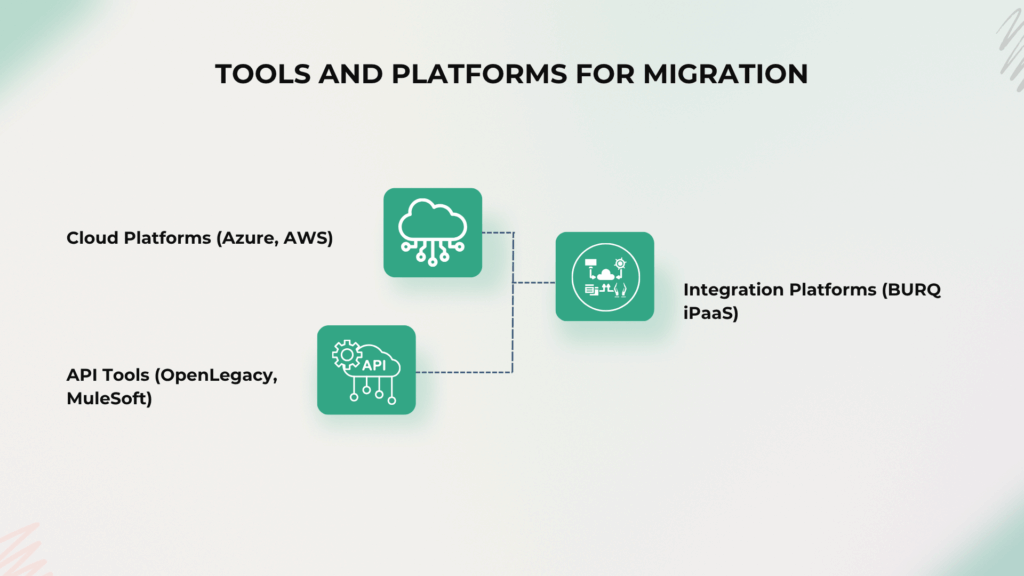
Cloud Platforms (Azure, AWS):
Cloud Platforms provide you with a scalable and secure infrastructure that makes migration smoother and opens doors to cloud-native innovation.
API Tools (OpenLegacy, MuleSoft):
These help connect legacy systems to modern applications by creating APIs. Hence, moving you towards modernizing your business gradually without any disruptions.
Integration Platforms (BURQ iPaaS):
Modern platforms like BURQ iPaaS provide connectors, high automation, and a low-code or no-code approach that make legacy system migration and integration a breeze. They save time, reduce complexity, and improve reliability during your migration journey.
What Comes After Migration?
Migration is just the first step towards your modernization journey, there is much more that comes ahead.
DevOps and Continuous Integration:
You can automate testing, deployment, and monitoring to speed innovation and minimize errors in your new environment.
Cloud-Native Tools:
You can use containers, microservices, and serverless computing for building scalable and flexible applications.
Continuous Modernization Mindset:
You must think of modernization as an ongoing process, just like Kaizen. Regularly review your systems and update them to keep up with new changes in business and technology.
Final Words
Legacy system migration can feel overwhelming to you, but it is unavoidable for businesses that aim to stay secure, compliant, and innovative in 2025. If you understand the types of migration, follow a clear process, prepare proactively for challenges, and most importantly, choose the right tools, then you can succeed for sure. API integration is a vital part of your migration journey, and powerful platforms like BURQ iPaaS make it easier to connect your legacy systems with modern applications and speed up your transformation.
If you are looking for the right options for your legacy system migration, then you must try BURQ iPaaS. It simplifies complex integrations, saves precious time, and helps you modernize without disrupting your operations! So move quickly, as 2025 is here!
FAQs
What is the difference between cloud and legacy systems?
Cloud systems run on modern and scalable infrastructure that can be accessed via the internet. They allow easy updates and integration. Legacy systems are older, often depend heavily on hardware, and are difficult to update or integrate with new technology.
Are legacy systems still used?
Yes, many organizations still rely heavily on their legacy systems because they are important for their daily operations or too costly to be replaced. However, most businesses are now planning or migrating to modern platforms.
What is legacy data transfer?
Legacy data transfer means moving data from old systems to new environments while maintaining data integrity, security, and causing minimal disruption to business processes.
What are the limitations of legacy systems?
Legacy systems have limited scalability, poor integration capabilities, security vulnerabilities, a lack of vendor support, and high maintenance costs.