Are you tired of juggling data between separate systems? If your sales team uses Salesforce CRM and your finance or operations run on a different ERP, you’re likely facing data silos, duplicate entries, and slow processes. Imagine all that information flowing together, orders, inventory, and customer records updating in real time across your business. ERP integration with Salesforce makes this possible.
In this article, you’ll learn how connecting Salesforce to your ERP unifies data, streamlines workflows, and boosts efficiency, and how to integrate ERP with Salesforce? with clear, step-by-step guide. By the end, you’ll have an actionable plan to implement Salesforce–ERP integration that aligns with your goals. Let’s dive in and transform your processes for better decision-making and growth.
Why Integrate Salesforce with Your ERP?
Connecting your Salesforce CRM to your ERP unlocks many benefits for you and your team. Here are the top advantages:
Unified 360° View
Integration gives your teams a single source of truth. Customer data in Salesforce (orders, contacts) automatically updates corresponding records in the ERP, and vice versa. For example, when a sales order is created in Salesforce, it can automatically update the ERP with order details and adjust inventory levels. This real-time data sync ensures sales, support, and finance all see the same information, enabling faster, more informed decisions.
Increased Efficiency
Automating data flows eliminates manual work. You won’t have to re-enter orders, invoices, or customer info across systems, which reduces errors and saves time. Faster approvals are another payoff: with integrated data, quotes and orders can move from Salesforce to ERP immediately, cutting process delays. As a result, your staff can focus on selling and serving customers rather than managing spreadsheets.
Improved Accuracy and Reporting
Integrated data means better reporting. With one-click access to combined Salesforce and ERP data, you can generate accurate cross-system reports on sales performance, inventory status, and financials. You gain visibility into trends that span departments, so forecasting and compliance become much simpler.
Cost Savings
Maintaining separate systems can be costly. Integrating into a unified platform often reduces IT overhead by consolidating maintenance and licenses. Fewer manual processes also mean lower labor costs. In real-world cases, companies have seen dramatic ROI from Salesforce–ERP integration, for instance, one firm reported a 30% reduction in operational costs and 20% boost in efficiency after connecting Salesforce with their ERP.
Better Customer Experience
Ultimately, all these efficiencies improve service. Your team can give customers more accurate answers faster because everything (order status, inventory, billing) is connected. This holistic approach increases customer satisfaction and enables upselling based on full purchase history.
In short, ERP integration with Salesforce transforms siloed information into actionable intelligence. It empowers your business with unified data and streamlined processes, so you can outpace competitors and adapt quickly to change.
Different ways to Integrate ERP with Salesforce?
Now we will discuss how to integrate ERP with salesforce? The truth is, there isn’t a single way to do it. The best approach depends on your specific business.
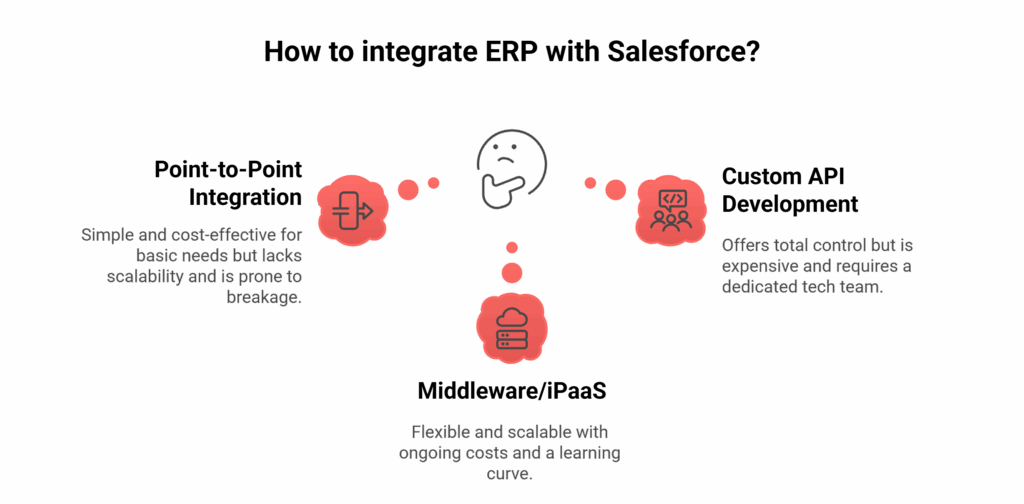
You’ve got three main options for a salesforce integration with erp:
Point-to-Point Integration
This is the most basic approach. You build a custom, point-to-point connection between Salesforce and your ERP. Think of it like building a single, small bridge between two buildings.
- The upside: It can be cheap and simple if your needs direct and basic integrations.
- The downside: It’s not scalable at all. As soon as you need to connect another system, you have to build a whole new bridge, as it is limited to connecting two systems at a time. Small update on either end can break the whole thing.
Middleware/iPaaS (Integration Platform as a Service)
You can also use middleware, a cloud-based platform that acts as a central hub. Instead of connecting your systems to each other, you connect each system to the hub. Platforms like Burq are perfect for this, offering a low-code approach with pre-built connectors that make the process a lot faster.
- The upside: It’s incredibly flexible and scalable. You can connect new systems without messing up your old connections. It’s also much easier for your team to manage. This is the best choice for a business that plans on growing.
- The downside: You have an ongoing subscription cost, and there’s a small learning curve to get started.
Custom API Development
This is the build-it-yourself option. You hire a team of developers to write a completely custom integration using the APIs of both your ERP and Salesforce.
- The upside: You get total control. You can build something that perfectly fits even the most unique, complicated processes.
- The downside: It’s super expensive and takes a long time. You’re also responsible for all the maintenance and security, which requires a dedicated tech team. This is for huge enterprises with highly specific needs.
Which ERP Works Best with Salesforce? Choosing Your System
You might wonder: Which ERP should I use with Salesforce? The answer depends on your unique needs. There’s no single “best” ERP for Salesforce, it’s about fit. Consider what functions matter most (finance, inventory, HR, etc.), your industry, and your growth plans.
Many organizations choose from these common ERP platforms that integrate well with Salesforce:
- SAP S/4HANA: A robust global ERP (often used by large enterprises). Salesforce offers connectors to sync data with SAP modules (finance, supply chain).
- Oracle NetSuite: A cloud-based ERP popular with mid-market companies. NetSuite provides out-of-the-box Salesforce integration to share orders, financials, and customer info.
- Microsoft Dynamics 365 (Business Central/FO): Offers deep functionality for finance, operations, and commerce. It has flexible APIs and third-party connectors to Salesforce.
- Sage Intacct or Sage X3: Many companies use Sage ERPs for finance. These have native or partner-built Salesforce connectors for syncing contacts, invoices, etc.
- Infor CloudSuite, Epicor, Acumatica, Odoo: Other modern ERPs with integration options.
The key is matching features to your business. Larger enterprises might lean toward SAP or Oracle, while growing businesses might find NetSuite or Dynamics 365 more agile. Whatever ERP you pick, ensure it exposes APIs or has a connector to Salesforce. Ultimately, integrating any ERP with Salesforce will reduce manual work, improve decision-making, and streamline operations. The best ERP will be the one that lets your teams work together efficiently in the Salesforce-ERP ecosystem.
Step-by-Step Guide for ERP Integration with Salesforce
Integrating an ERP system with Salesforce isn’t just a plug-and-play operation, it’s a multi-step process that requires clear planning, cross-team alignment, and the right technology stack. Let’s walk through the typical stages of ERP-Salesforce integration:

Step 1: Define Use Cases
Start by narrowing down exactly what needs to be integrated and why. Don’t just say “we want full sync.”
- Are you syncing customers and accounts between systems?
- Do you want orders from Salesforce to trigger updates in your ERP?
- Should ERP invoices automatically appear in Salesforce?
- Are inventory levels going to be visible to sales teams?
Be as specific as possible. Map out which data objects (e.g., customers, orders, products, payments) should flow between systems and in which direction, one-way or bi-directional. This stage is crucial in scoping the technical complexity and licensing requirements.
Step 2: Choose Your Integration Method
There are three main approaches to connecting ERP with Salesforce:
- Point-to-point integration (e.g., custom API scripts): Quick to start but hard to maintain as your ecosystem grows.
- Middleware-based integration (e.g., BURQ, MuleSoft): Scalable and flexible; decouples systems for better long-term resilience.
- Native connectors (e.g., prebuilt plugins or AppExchange apps): Fast and easy but often limited in flexibility and customization.
Your choice should strike a balance between cost, speed, complexity, and future scalability.
Step 3: Clean & Normalize Data
This is where many integrations get stuck. Even the most advanced tools can’t magically align messy data.
- Align naming conventions, date formats, currency fields, etc.
- Decide on master data rules, if the same customer exists in both systems, which version wins?
- Cleanse duplicates, patch incomplete records, and unify formats.
This stage often takes longer than expected, especially if your data hygiene isn’t great. But doing it now saves countless sync errors down the road.
Step 4: Build or Configure Workflows
Here’s where you set up the actual flows that move data between systems. Platforms like BURQ offer a visual builder where you can:
- Drag-and-drop flow elements to define your logic
- Set up triggers (e.g., “on new Salesforce opportunity”)
- Apply transformation rules (e.g., convert Salesforce tax field to ERP format)
- Configure retries, error-handling, and logging
Instead of writing code, you’re visually designing logic. This saves engineering time and makes it easier to collaborate with non-technical stakeholders.
Step 5: Test with Real Data
Don’t rely solely on sandbox or dummy data. Test your workflows with real, production-like data to uncover:
- Edge cases like special characters, unusual record types, or missing fields
- Timing mismatches due to asynchronous processes
- Duplication risks when syncing bi-directionally
Use logs, alerts, and dashboards to track what’s flowing where and why. IPaaS offer built-in observability to help catch issues before they hit production.
Step 6: Go Live in Phases
Avoid the “big bang” launch. Instead, roll out your integration in phases:
- Start with a single use case (e.g., syncing closed-won opportunities to ERP orders)
- Monitor performance, data accuracy, and edge cases
- Gather feedback from business users
- Gradually expand to additional objects like inventory, pricing, or invoicing
This approach lowers risk and helps your teams adjust incrementally. If you’re using an iPaaS platform like BURQ, you can clone, adjust, or version your integration pipelines easily as needs evolve.
By the end of this phase, your ERP and Salesforce systems should be sharing data seamlessly supporting both operational execution and customer engagement in real time.
Best Practices for Salesforce-ERP Integration
To ensure a successful integration, follow these best practices:
Clean and Standardize Data
Start with high-quality data. Remove duplicates, enforce consistent field formats, and ensure both systems use the same identifiers (e.g., account codes). As experts recommend, cleansing and mapping data upfront avoids garbage-in/garbage-out.
Define Clear Workflows
Document exactly which Salesforce and ERP processes will be linked. For example, decide how price changes in the ERP update Salesforce quotes, or how new Salesforce accounts should create customer records in the ERP. Clear business rules prevent confusion and duplicate records.
Secure Your Integration
Protect sensitive data. Use OAuth or secure tokens for API connections. Restrict user permissions so that only authorized profiles can trigger integrations. As part of setup, verify that both systems comply with your industry’s security standards.
Test with Real Scenarios
Go beyond unit tests. Perform end-to-end tests covering all use cases (sales orders, returns, inventory updates, etc.) with real data. Validate that once data flows through both systems, reports and dashboards in each system update correctly.
Set Up Monitoring and Alerts
Use logging to capture errors or mismatches. Many integration platforms allow alert emails or retry queues. Regularly review logs so you catch issues early. For example, ensure any failed sync (like a record that didn’t transfer) triggers an immediate notification.
Plan for Version Control
Keep track of integration configurations. If either Salesforce or your ERP is upgraded (new fields, changed APIs), make sure your integration is updated accordingly.
Engage Stakeholders
Involve IT, sales, finance, and operations teams throughout. Understand their pain points and keep them trained on new processes. Having business input early helps catch requirements you might miss as an IT person alone.
By following these practices, especially thorough testing and ongoing monitoring you’ll ensure the Salesforce-ERP integration is robust and continues to deliver value.
Conclusion
Integrating your ERP with Salesforce transforms your business by unifying sales, finance, and operations data. You’ve learned what this integration entails, why it matters, and how to plan and execute it. The result will be optimized workflows, fewer errors, and a comprehensive 360° view of your operations. To achieve this with confidence, use Burq, our proven integration platform, and AI-powered iPaaS that simplifies connecting Salesforce to any ERP. Burq offers low-code connectors and automation so you can deploy integrations faster and maintain them easily.
Ready to unlock the full potential of your data? Visit Burq.io to schedule a demo and see how our end-to-end platform can make your Salesforce–ERP integration smooth, scalable, and secure.
FAQs
How often should data sync between Salesforce and ERP — real-time or batch processing?
It depends on your use case: transactional data (orders, inventory) often benefits from near-real-time sync, while less volatile data (master records) can be batched. You’ll want to balance performance, API limits, latency, and error handling when choosing your rhythm.
Which ERP “plays best” with Salesforce — is there a “best” ERP for integration?
There’s no one-size-fits-all “best” integration — many ERPs (NetSuite, SAP, Dynamics, Rootstock, etc.) offer connectors or APIs for Salesforce. The right choice depends on your industry, processes, customization needs, and how “open” the ERP is to integration.
Do I need middleware or can I just use APIs directly for integration?
You can build direct API-to-API integration, but middleware (iPaaS, ESB) often gives you reusable connectors, transformation logic, error handling, versioning, and monitoring. Especially when more systems are involved or complexity grows, middleware tends to reduce maintenance burden.
What are the common pitfalls or “pain points” people face in ERP–Salesforce integration?
Data mismatch, API limits, latency, versioning changes, conflicting updates, and incomplete data cleansing are major challenges. Many integrations get derailed when teams underestimate the complexity or fail to properly handle edge cases and error recovery.
If I already have PLM or another system built on Salesforce, do I still need middleware for ERP integration?
It depends, if your PLM, ERP, and CRM all natively “live” in the Salesforce ecosystem, they might share data more easily. But in most cases, you still need middleware or connectors to orchestrate the data flows, especially if you bring in external systems like SAP or Epicor.
How much custom code ends up being required, even when using connectors or integration tools?
Often more than expected. Many teams discover that standard connectors don’t handle all business logic, transformations, or edge cases, so they end up adding custom code around them to glue everything together.