Best Practices for Shopify Integration
Shopify integrations connect your store with different ERPs, CRMs, marketing platforms, and order fulfillment tools.
Hence these integrations make your e-commerce operations more efficient. But on the flip side, improper integrations can result in errors, slowdowns, or even lost sales. Let u have a look at how to integrate Shopify properly:
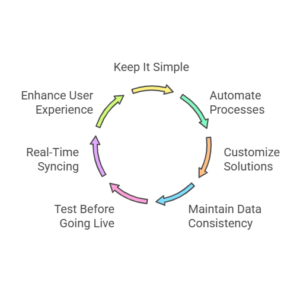
Keep It Simple
A very common mistake in Shopify eCommerce integration strategies is when adding too many integrations at once.
Although Shopify provides thousands of apps, overloading your system is never a good idea. It can slow performance, create compatibility issues, and increase costs.
- Firstly, you must start with the essential requirements, such as inventory management, order processing, and shipping. Once these integrations are stable then you must expand to marketing, analytics, and customer experience tools. For example, you must make sure that your order fulfillment process is automated and integrated with logistics providers so that your shipping is smooth and swift.
- Secondly give priority to native integrations over third-party apps, because they work more smoothly with Shopify. Native integrations are usually more trustworthy and do not need any complex configurations. Thus they minimize the risk of system errors.
- Thirdly conduct an audit of your existing tech architecture to steer clear of any redundant tools that overlap in functionality. For example, if you are already using a marketing platform with CRM features, then integrating another CRM tool will be confusing and also redundant.
Starting with the basics does not mean that you are sacrificing growth. It means that you are setting a strong base that you can expand upon as your company grows.
Automation
Manual processes tend to slow down operations, magnify errors, and make scaling up difficult for you.
On the other hand, automating basic workflows is essential for running a Shopify store that is guaranteed to outperform.
- Inventory automation: For automating inventory processes, you must connect your Shopify store to an ERP like Microsoft Dynamics to sync inventory in real time. This avoids inventory overselling and stock errors. You can always be sure that you never sell out-of-stock products and miscommunicate customers about product availability. Automation can also help you track raw material supplies and manage stock levels.
- Order automation: If orders are automated, it is a huge loa that is taken off your shoulders. You can automate order fulfillment by integrating Shopify with third-party logistics (3PL) providers like ShipStation. This will boost the shipping speed and minimize human errors, as automated systems are faster, more accurate, and more efficient.
- Marketing automation: Use email and SMS automation tools like Klaviyo and Omnisend to deploy targeted marketing campaigns according to customer behavior. Automated email campaigns generate much more revenue than standard campaigns. Moreover, automation enables you to set up personalized reminders about abandoned carts, engagement emails, and follow-ups, which can kick off customer conversion rates.
Hence, By automating your repetitive processes, you can have ample time that you can devote to high-priority activities, such as customer engagement and long-term planning.
Automation is not merely a tool to put you at ease, rather it is a must for boosting the growth of your store.
Customization
We believe that every eCommerce business is unique and has its requirements.
This is why selecting integrations that provide high customization is important. Over-the-shelf solutions usually fail to fulfill your unique needs.
- You must search for apps with open APIs, allowing custom integrations for your unique workflows. Open APIs give your team the flexibility to create custom solutions that are according to your business model.
- Use the GraphQL API of Shopify for personalized experiences, such as dynamic product recommendations or custom checkout. GraphQL facilitates quicker and more flexible queries as compared to REST APIs. Hence, enhancing the user experience on both the front and back end.
- When choosing between ERP or CRM systems, you have to be sure that they support industry-specific workflows (e.g. B2B eCommerce). Customization is the key for businesses operating in niches. For example, a subscription-based business requires a system that can handle recurring billing and a dynamic pricing model. This is something that a traditional CRM may not provide.
Customization is key to providing unique services to your customers. By milking upon APIs and custom solutions, you can devise a smooth and personalized experience for both your team and your customers.
Maintain Data Consistency
Having consistent data across all systems is mandatory, Inconsistent data can result in order errors, inaccurate reporting, and a bad customer experience.
A well-integrated system keeps all data synchronized.
- Product data synchronization: you must make sure that all product descriptions, images, and prices are the same across Shopify, marketplaces (Amazon, eBay), and social commerce platforms. This is very important for providing accurate information to customers, which can also enhance your SEO and product visibility.
- Customer data consistency: Integrate Shopify with a CRM like HubSpot or Salesforce to maintain customer profiles, clearly segment audiences, and personalize customer engagement. A consistent customer profile can let you craft targeted marketing campaigns and enhance customer retention rates.
- Sales data accuracy: it is very important to sync your financial transactions between Shopify and accounting software like QuickBooks. This will prevent errors and mismatches in revenue tracking. It will also warrant that your books are always updated. Hence, it will become easier to track performance and prepare for tax season.
By giving priority to data consistency, you minimize the chances of errors, enhance customer satisfaction, and get a deeper understanding of your business performance.
Data is the most valuable asset that should flow in harmony between all integrated platforms.
Test Before Going Live
Before you roll out integration, it is important to test it exhaustively. This will identify potential issues and prevent problems.
- You can use Shopify’s sandbox environment to simulate transactions and evaluate how integrations interact before deploying them on your live store. The sandbox environment lets you execute end-to-end testing without the risk of affecting real customer transactions.
- You must execute stress testing to gauge how integrations manage high traffic time, especially during peak sales seasons like Black Friday. Testing your integrations under high demand will tell you whether your systems can handle a high volume of traffic without crashing or slowing down.
- Conduct data integrity checks, to assure that inventory levels, order statuses, and customer records are consistent after syncing. You do not want to risk losing data during peak seasons or incur issues like double orders or incorrect inventory counts.
Testing is a valuable activity that can save you time and money in the future. By identifying issues before going live, you can have a flawless launch and minimize possible customer complaints.
Real-Time Syncing
Delayed data update is a common issue faced by Shopify store owners. This often leads to mismatched inventory levels or slow order processing. Real-time data syncing overcomes these problems.
- Inventory syncing: you can connect Shopify with your warehouse or fulfillment center with real-time inventory updates. This prevents overselling. Real-time syncing also makes sure that your stock levels are updated immediately after a sale or restock.
- Order syncing: You must make sure that customer orders are immediately cascaded in your ERP so that there are no delays in fulfillment. Reduction in fulfillment time results in faster shipping and happy customers.
- Multi-channel syncing: If you sell on multiple platforms (Shopify, Amazon, Instagram), then integrate with tools like ChannelAdvisor to keep pricing, stock levels, and order details the same. Multi-channel syncing lets you avoid mistakes like selling the same product at different prices across different channels.
Real-time syncing enhances visibility and also keeps data updated. This aids in decision-making and gives a smooth customer experience over all channels.
User Experience
A smooth user experience is highly beneficial for both parties, your customers and you, including your teams. Poorly integrated systems can slow down site speed, affect workflows, and frustrate users.
- Mobile optimization:
You have to be sure that all your integrations function error-free on mobile devices. According to Statista more than 80% of eCommerce website visits are from mobile users. This makes it mandatory to warrant that your integrations, like payment gateways and customer support tools, perform the best on a mobile device.
- Page speed:
A few third-party integrations often slow down Shopify stores. You must utilize the performance insights of Shopify to identify apps that are causing the lag and improve loading times. Slow page load times can lead to cart abandonment and lost sales, so maximizing the speed is a must for getting better conversion rates.
- Intuitive backend:
You must select integrations that have highly user-friendly dashboards. This is beneficial as it reduces the learning curve for your team. A simple, intuitive interface helps your team manage integrations easily, resulting in higher productivity and fewer errors.
User experience is a major driver of customer satisfaction and operational efficiency. By emphasizing mobile optimization, speed, and ease of use, you guarantee that both your team and your customers have the best experience.
Conclusion
To summarize, implementing Shopify integration best practices is a pre-requisite for uplifting your eCommerce store.
By giving priority to important integrations like automation, data consistency, and real-time syncing, you can maximize your operations, boost customer experiences, and scale easily.
Successful best practices such as testing before going live, mobile optimization, and data accuracy all result in better workflows and swift fulfillment. By employing these strategies, your Shopify store will run efficiently, and let you prioritize business growth.
The most important question is to choose the best integration solution. Burq iPaaS outshines as it is a reliable, simple platform for connecting your Shopify store with much-needed tools.
It provides easy and accurate data syncing, automated processes, and real-time updates. Burq iPaaS can reshape, revamp, and uplift your eCommerce operations.
Thus be ready to maximize your Shopify store and visit Burq iPaaS for out-of-the-box integration to unleash the full power of your store!