If you use Shopify to manage online sales, QuickBooks for accounting, and Salesforce for customer relationships, you already know the pain of disconnected systems. Order data sits in Shopify. Invoices are processed separately in QuickBooks, and your sales team is working in Salesforce without full visibility.
These disconnections lead to delays in invoicing, manual errors, and fragmented customer experiences. Finance, operations, and sales teams often operate on incomplete or outdated information, and that slows everything down.
Burq iPaaS is designed to pull these scattered systems into sync, without the mess of custom APIs or the limitations of lightweight automation tools. It gives you a central brain that connects Shopify, QuickBooks, and Salesforce into a single, real-time operation.
We’re not just talking about syncing data; we’re talking about creating workflows that reflect how your business works. From order to invoice to CRM. From quote to cash. From the moment a customer buys to the day their payment clears.
In this blog, you’ll see what’s possible when you bring these platforms together the right way. We’ll break down key use cases for each pair, show how Burq simplifies complex flows, and give you a look at the kind of operational impact you can expect by connecting QuickBooks, Shopify, and Salesforce.
Why is integrating QuickBooks, Shopify, and Salesforce Important?
Shopify, QuickBooks, and Salesforce each serve a core business function: ecommerce, accounting, and CRM, respectively. But without integration, data stays siloed, and workflows break down.
Companies with disconnected systems face the following problems:
- Duplicate data entry across systems
- Delayed invoicing due to missing order data
- Sales teams lack visibility into customer purchase or payment status
- Inventory mismatches caused by unsynchronized stock levels
- Inaccurate reporting due to fragmented data sources
These issues increase operational overhead and lead to customer service delays, payment errors, and poor cross-team coordination.
Integrating these systems with Burq iPaaS helps you:
- Sync data in real-time across platforms, no manual transfers
- Automate core processes, like order-to-invoice or quote-to-cash
- Reduce errors by ensuring consistency across sales, finance, and ecommerce
- Unify customer records, giving teams accurate, up-to-date information
- Shorten order-to-cash cycles and improve customer communication
With Burq, your platforms stay aligned without requiring custom development or ongoing maintenance. It’s a scalable way to connect your operations and eliminate unnecessary data silos.
Key Use Cases for Shopify, QuickBooks, and Salesforce Integration
When you connect Shopify, QuickBooks, and Salesforce using Burq iPaaS, you unlock end-to-end visibility across ecommerce, finance, and sales. Below are detailed use cases for each pair, and then all three together.
Case 1: Shopify ↔ QuickBooks Integration
- Automatically create invoices or sales receipts in QuickBooks when a new order is placed in Shopify
- Sync product SKUs, quantities, tax, discounts, shipping costs, and payment methods
- Push refund and return data from Shopify into QuickBooks accounting
- Match Shopify customers to existing QuickBooks customers, or create new ones
- Update QuickBooks inventory based on Shopify sales (if enabled)
QuickBooks → Shopify
- Push inventory levels from QuickBooks to Shopify to avoid overselling
- Sync financial rules like discounts or tax rates (for advanced flows) back to Shopify
Case 2: Shopify ↔ Salesforce Integration
- Create leads or contacts in Salesforce from new Shopify customers
- Log high-value orders as Salesforce opportunities
- Sync order history to CRM fields for better segmentation
- Trigger Salesforce marketing automation based on purchasing behavior
- Send order status updates to Salesforce support teams via Cases
Salesforce → Shopify
- Push loyalty status, lifecycle stage, or segmentation tags into Shopify customer profiles
- Enrich Shopify accounts with sales rep notes or campaign data
- Deliver personalized Shopify experiences from CRM intelligence
Case 3: Salesforce ↔ QuickBooks Integration
- Generate invoices in QuickBooks when a Salesforce opportunity is marked “Closed Won”
- Sync Salesforce contact or account data directly into QuickBooks customers
- Convert quotes into invoices, including all product/service line items
- Trigger subscription billing setups based on Salesforce data
- Update Salesforce opportunity stages based on payment status
- Push overdue invoice alerts or transaction history into CRM fields
- Power Salesforce dashboards with live financial data from QuickBooks
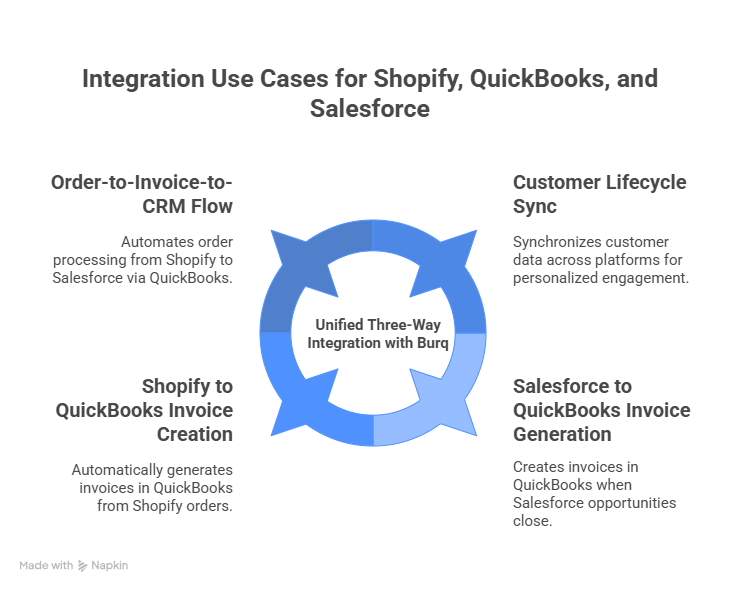
Case 4: Shopify + QuickBooks + Salesforce: Unified Three-Way Workflows
Burq iPaaS supports powerful three-way integration logic that connects Shopify, QuickBooks, and Salesforce in a single flow:
Order-to-Invoice-to-CRM Flow
- Customer places an order in Shopify
- Burq automatically:
- Sends order details to QuickBooks to create an invoice
- Pushes customer and order data to Salesforce to create a new lead or opportunity
- Optionally updates the Salesforce record as the invoice is paid
Customer Lifecycle Sync
- A new customer in Shopify is created in both QuickBooks and Salesforce
- CRM lifecycle updates flow back into Shopify for personalized engagement
- QuickBooks return/refund trends update the customer risk score in Salesforce
Revenue Attribution Loop
- Salesforce opportunity closes → Burq generates a QuickBooks invoice
- Shopify order fulfillment updates the opportunity stage in Salesforce
- Salesforce revenue dashboards combine ecommerce and accounting performance
How Does Burq iPaaS Power These Integrations Seamlessly?
When one system updates, for instance, a new order drops into Shopify, you don’t want to wait around for your finance or sales tools to catch up. Burq solves this with an event-driven approach. That means it listens for specific changes and responds instantly, instead of relying on timed syncs or manual exports.
For example, a completed order in Shopify can instantly trigger two things: an invoice in QuickBooks and a new opportunity in Salesforce. It’s fast and happens behind the scenes. No human intervention. No sync delay.
This kind of setup eliminates data lag. You avoid the gaps where sales see one version of a customer, and finance sees another. Everyone’s looking at the same thing, at the same time.
Burq treats each integration as an independent event, it can scale without the systems choking under pressure, whether you’ve got 50 orders a day or 5,000.
Below are some components of Burq that allow you to integrate QuickBooks, Shopify, and Salesforce seamlessly.
Unified, Event-Driven Architecture
Burq isn’t polling for changes on a timer and hoping it catches up. It works event-driven, meaning it reacts to system events the moment they happen. For instance, when a Shopify order is placed (an event occurs), it triggers a workflow instantly.
Does a payment clear in QuickBooks? Burq captures that and notifies Salesforce within seconds. This event-driven approach ensures real-time data consistency across all systems without relying on outdated sync jobs.
Modular Integration Components
A lot of “integrations” are just rigid scripts or one-size-fits-all workflows. But business logic rarely stays that simple. Maybe you only want to sync orders above $100. Or maybe QuickBooks needs customer details formatted a certain way. Burq gives you tools to handle that. Not with code, but with drag-and-drop logic blocks,
Some of what you can plug together includes:
- Triggers (e.g., Shopify new order, Salesforce opportunity stage changed)
- Actions (e.g., create QuickBooks invoice, update Salesforce contact)
- Transformers (for cleaning, enriching, or mapping data)
- Conditionals (e.g., “only if order total > $500”)
- Loops & branches (for complex logic like bulk line-item processing)
These components let you design integrations visually or script them using low-code blocks, ideal for tech-savvy ops and business teams.
Pre-Built Connectors with Enterprise-Grade Abstraction
Each connector (Shopify, Salesforce, QuickBooks) is deeply modeled to expose every field, object, and operation the platform supports. You don’t have to memorize APIs or manage tokens manually.
With Burq:
- OAuth-based secure authentication is already built-in
- Rate limits and pagination are handled automatically
- Errors are gracefully retried or routed to fallbacks
- Every connector is versioned for backward compatibility
Centralized Monitoring, Logging & Alerting
For technical and operations teams, Burq offers central visibility into every packet of data flowing between systems. This includes:
- Per-record status (Success, Retry, Failed)
- Timestamped execution logs
- Error categorization (timeout, validation, API failure)
- Retry counts and escalation flows
- Live dashboards for integration, health, and throughput
Built-In Data Mapping and Transformation
Data coming from Shopify rarely looks like what Salesforce or QuickBooks expects. Burq’s built-in data transformation engine lets you:
- Map fields across systems with drag-and-drop simplicity
- Use expressions to clean, combine, or format data
- Handle currency conversions, timezone adjustments, ID lookups
- Define fallback defaults or condition-based mapping rules
Designed for Scalability and Change
As your stack evolves, adding apps, adjusting logic, or handling volume spikes, Burq adapts. With features like:
- Scalable parallel execution of flows
- Version-controlled workflows
- Role-based access and audit logs
- Sandbox and production environments
- One-click deployment and rollback
In short, Burq doesn’t just connect Shopify, QuickBooks, and Salesforce; it turns them into a cohesive operating system for your business. Unlike point-to-point scripts or limited middleware tools, it gives you full visibility, control, and scaling opportunities.
What Data Can You Sync in QuickBooks, Shopify, and Salesforce with Burq?
If you’re running Shopify for sales, QuickBooks for finance, and Salesforce to manage leads, you know how tricky syncing data among these platforms is. Burq takes a lot of that hassle off your plate. It doesn’t just push data, it makes sure each system gets what it needs, in the exact format it expects.
For instance, someone places an order on your Shopify store. That can trigger a Salesforce opportunity while also generating an invoice in QuickBooks, complete with all the line items, taxes, and shipping details. You don’t need to export files, clean the data.
Here’s how you can handle data synchronization among different platforms with Burq
Shopify → Salesforce
- Customer profiles (name, email, loyalty tier, etc.)
- Orders mapped to opportunities or leads
- Fulfillment updates feeding into sales tasks
Shopify → QuickBooks
- Orders with full line-item detail
- Tax, shipping, and discount info
- Refund and return data
Salesforce → QuickBooks
- Closed-won deals turned into invoices
- Customer info synced to billing
- Payment terms and contract data pushed to finance
QuickBooks → Salesforce
- Payment status updates for active opportunities
- Receivables reflected in account dashboards
- Past-due alerts surfaced for sales follow-up
What Makes Burq Better Than Zapier and Celigo?
If you’re trying to connect tools like Shopify, Salesforce, and QuickBooks, generic automation platforms often fall short. Burq is designed from the ground up for multi-platform ecommerce, giving you deeper control, cleaner data flows, and a far more scalable architecture than what Zapier or Celigo offer.
Unlike no-code tools that mainly cater to basic task automation, Burq is purpose-built for complex, multi-step workflows across systems that don’t always play nicely together. Whether you’re handling bulk inventory syncs, tax-inclusive invoicing, or sales opportunity enrichment, Burq is made to handle that logic natively, without workarounds.
Its visual workflow builder makes it easy for operations or business users to build and manage flows, no coding required. At the same time, developers can go deeper with conditional logic, custom transformers, and branching that’s hard to replicate on lighter tools.
Burq provides detailed logs, categorized errors, retry attempts, and built-in fallbacks so operations don’t halt. Zapier and Celigo often fall short when it comes to transparency and recovery.Burq is ready to scale, whether you’re a growing ecommerce brand or an enterprise processing thousands of transactions daily. Features like tenant isolation, rate-limit governance, throttling, versioned APIs, and field-level data transformation are some of the most interesting features of Burq that make it outshine its competitors.
Below is the comparison table of Burq vs Zapier vs Celigo.
| Feature/Capability | Burq | Zapier | Celigo |
| Workflow Builder | Visual + Low-Code | Visual (No-code) | Visual + Configuration-based |
| API Depth & Field-Level Access | Full access to all fields/objects | Limited field access | Moderate to Full |
| Error Handling & Retry Logic | Built-in retries + fallback routing | Basic retry | Retry with some customization |
| Transformation & Mapping | Field-level + conditional logic | Minimal | Strong |
| Rate Limit & Throttling Control | Built-in | Limited | Partial |
Benefits of QuickBooks, Shopify, and Salesforce Integrations
- Unified Customer Data – Keep customer info consistent. The data is updated automatically across all systems.
- Real-Time Order Sync – Orders from Shopify automatically show up in Salesforce and QuickBooks, and no manual handoffs are required.
- Faster Billing – Sales trigger instant invoicing. No risk of delays, duplicates, or incorrect data.
- Sales & Finance Alignment – Representatives can check invoice status, purchase history, or payment issues without switching tabs or taking follow-ups with the accounting department.
- Inventory Accuracy – Product stock stays in sync across storefront and CRM. This helps avoid overselling or missed deals.
- Fewer Manual Tasks – Burq decreases your manual work significantly. This reduces data silos and increases transparency between systems.
- More Time for Real Work – With data moving automatically, your team stays focused on growth and saves time that would be wasted in managing middleware when integrating QuickBooks, Shopify, and Salesforce.
Faster Setup, Lower Costs: What to Expect When Integrating with Burq?
Setting up integrations across QuickBooks, Shopify, and Salesforce often means weeks of development or costly third-party consultants. With Burq, that overhead is dramatically reduced, both in time and budget.
- Minimal Engineering Required – You don’t need to build from scratch. Burq offers pre-built connectors with ready-made field mappings and authentication flows.
- No Custom Scripts – Business logic, data mapping, and transformations are handled through a visual workflow builder. That cuts out the need for ongoing script maintenance.
- Accelerated Timelines – Most standard use cases go live in days, not months. You can launch faster, test faster, and iterate without waiting on dev cycles.
- Lower Integration Costs – Since there’s less custom code and fewer hours spent on setup, you save on both internal engineering time and outsourced development.
- Built-in Scalability – As your processes evolve, you don’t have to rewire the integration. Burq allows updates directly through the dashboard without restarting the project.
- No Surprise Maintenance – Error handling, retries, versioning, and monitoring are built in. That means fewer surprises and less firefighting.
Final Thoughts
Integrating Shopify, QuickBooks, and Salesforce doesn’t have to mean complex code, long timelines, or disconnected teams. With Burq, you get a platform built to handle the details, data sync, error handling, and scaling, so you can stay focused on running your business.
Whether you’re aiming to streamline your finance operations, improve sales visibility, or eliminate manual data entry, Burq aligns all three platforms. The result? Fewer silos, faster processes, and better decisions.
Ready to simplify how your systems talk to each other? Start integrating with Burq today.
FAQs
1. Can Burq sync data between all three systems in real-time?
Yes. Burq enables near real-time sync between QuickBooks, Shopify, and Salesforce, so updates in one system reflect quickly across the others.
2. How long does it take to set up integrations with Burq?
Most standard setups take a few hours. For more complex workflows, it typically ranges between 1–3 days depending on data volume and customization.
3. What kind of data can be transferred between these platforms?
Burq supports syncing customer records, orders, invoices, inventory, payments, and sales pipeline data between platforms.
4. Do I need coding skills to use Burq?
No. Burq offers a low-code interface with pre-built connectors, so most teams can configure integrations without writing code.
5. What if an integration fails or data doesn’t sync?
Burq logs every event. You get visibility into failures, and the system retries automatically where possible. Critical issues are flagged for review.