SaaS platforms are the foundation of your IT ecosystem, which keeps your organization running. They are easy to manage independently, but the trouble begins when you try to make them communicate with each other in real time and exchange data that is stored differently in each system.
Today, companies incorporate various SaaS applications, and research has highlighted that more than 85% of the business applications will become SaaS-based by the end of 2025. However, SaaS integration or what looks like a simple API handshake can quickly evolve into weeks of untangling schema conflicts if not managed properly.
Since the SaaS industry is growing rapidly, it has become challenging to integrate these applications to make them work as a centralized system. Below, you’ll find ten of the most persistent issues that might show up when you are integrating your SaaS tools, like CRM, ERP, PIM, or POS, etc. We have critically analyzed each challenge and provided practical solutions at the end of the blog that you might find helpful.
Understanding SaaS Integration
SaaS integration is nothing but a process of connecting two or more SaaS applications to exchange data between them, automate repetitive tasks, and optimize workflows. For instance, when separate cloud tools, like your CRM, support system, or marketing platform, work in isolation, every data handoff is a manual task. Integration, on the other hand, let these systems communicate and work in synchronization, passing data through APIs or middleware in real time.
As your tech stack grows, integration keeps things clean, consistent, and fast. Suddenly, your tools stop acting like individual apps and start operating as one connected system that supports how your team works.
Top 10 Common SaaS Integration Challenges
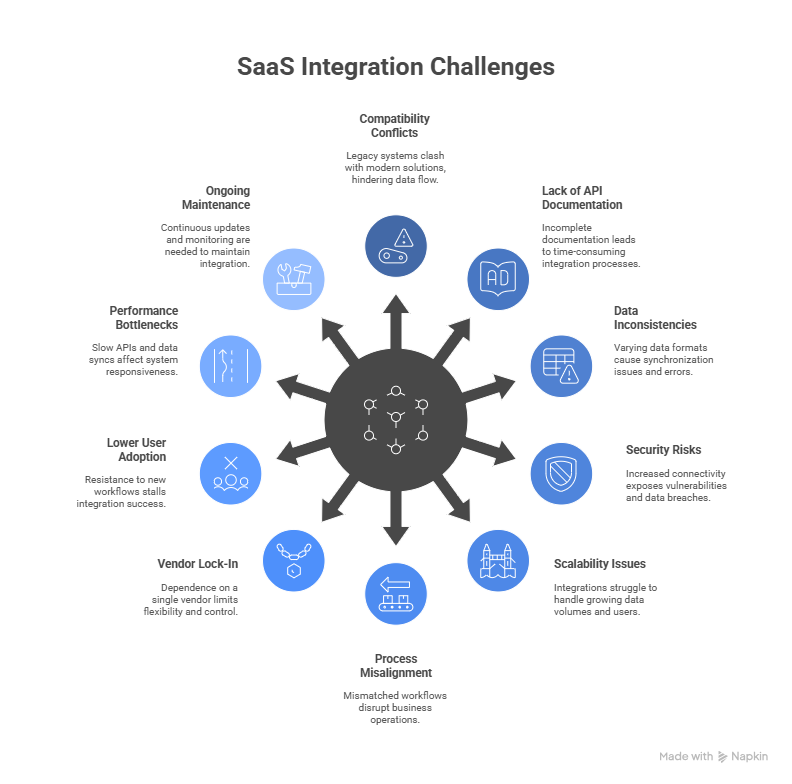
1. Compatibility Conflicts
Most organizations don’t start from scratch. They carry years of systems, workflows, and decisions into every new tool they adopt. This creates the problem of incompatibility of your legacy or third-party SaaS systems with modern enterprise solutions.
For instance, you might find that your CRM can’t push data into your finance platform without custom logic. Or that a third-party app doesn’t support the latest API standards. What seemed like a small edge case becomes the blocker when it comes to SaaS integration.
Compatibility issues often remain hidden until systems are required to interact beyond their typical parameters, and this is where the problem of compatibility arises during SaaS integration.
2. Lack of API Documentation
Even when an API of the SaaS enterprise software you’re using is technically available, its usability hinges on the clarity and completeness of its documentation. In practice, that standard is rarely met because, as per the research, only 10% of the IT organizations provide complete API documentation.
Hence, in the absence of thorough documentation, the process of SaaS integration becomes extremely time-consuming. Integrations stall, inconsistencies multiply, and teams are left spending hours deciphering what should have been plainly outlined from the beginning.
3. Data Mapping and Format Inconsistencies
SaaS platforms don’t always follow the same standard for storing and sharing data. One tool might use nested structures while another expects flat files. Some will store dates in UTC. Others might default to local time zones.
Due to these inconsistencies in data formats between SaaS systems, you end up with half-synced records, incorrect reports, and duplicate entries when you try to integrate such systems without defining the standard data formats.
4. Security Risks
The more applications are connected, the more surfaces there are to secure. Data in transit between cloud apps requires encryption. Authentication tokens must be protected. Access permissions need to be carefully managed, and even when your infrastructure is tight, it only takes one weak point in an external service to create risk.
What makes this more complicated is that not all SaaS tools follow the same security standards. Some rely on outdated encryption protocols. Others lack detailed access controls. For businesses working in regulated industries, overlooking these concerns is risky and can compromise your whole IT ecosystem.
5. Scalability
Integrations built for simplicity tend to fall short under pressure. Many out-of-the-box connectors work well when there are fewer systems in your IT infrastructure or for small teams, but when more users are added or data volumes increase, limitations start to show, and scaling becomes difficult.
Requests begin to time out. APIs hit usage limits. Scheduled syncs run behind, and with growing dependencies, these delays start affecting not just one department but entire operations. What was once a convenience becomes a bottleneck. Scaling requires more than adding servers. It demands architectural decisions that you can scale and adapt to suit new business needs.
6. Process Misalignment
Even if your apps are technically connected, the business logic might not line up. That’s because SaaS integrations often fail when workflows aren’t aligned across platforms.
For example, your CRM might push leads immediately, but your ERP system expects a multi-step approval. These mismatches in how data and actions flow can result in incomplete processes or system breakdowns, leading to internal inefficiencies and customer frustration.
7. Vendor Lock-In
One of the biggest challenges of SaaS integration is vendor lock-in. Once you have opted for a particular vendor for system integration, then switching to another becomes a complicated and costly endeavor. Moreover, as soon as your business becomes comfortable with SaaS integration, it is possible that months later, the vendor platform changes its terms.
Or the support team becomes unresponsive. Meaning you become completely reliant on the vendor, not only for integrations, but for security, compliance policies, and process workflows as well.
8. Lower User Adoption
No matter how sophisticated your integrations are, they’re only successful if your team embraces them. Unfortunately, user adoption is often a roadblock, especially when new workflows disrupt existing habits.
Whether it’s due to a lack of training, poor UI, or distrust in the accuracy of synced data, resistance from internal teams can stall the success of your integration efforts. This is one of the most overlooked SaaS integration issues that surfaces once the integrations are done and become live.
9. Performance Bottlenecks
When it comes to performance, fetching and converting data into useful insights is the key area where your integration should be fast and reliable. When you rely on a third party for SaaS integration, you become reliant on their APIs unknowingly. If those APIs are slow at fetching data, then the performance of your whole system will be compromised.
These delays can affect everything from customer response times to dashboard accuracy. The larger your data sets and the more frequent your syncs, the more likely you’ll hit performance-related cloud integration challenges.
10. Ongoing Maintenance
Finally, integrations aren’t a one-time setup. APIs evolve, app features change, and platforms introduce new authentication methods. Keeping everything running smoothly takes continuous effort.
If you’re not prepared for ongoing maintenance, even minor updates can break critical connections. Lack of version control or proactive monitoring can turn routine updates into system-wide outages, adding to the list of SaaS integration challenges you’ll need to manage over time.
How to Solve the Most Common SaaS Integration Challenges
Not every problem demands a complex fix, but nearly all of them require forethought. The following solutions don’t just address technical gaps, they help you plan smarter, move faster, and prevent setbacks that come underway your SaaS integration.

1. Build with Compatibility in Mind
Before you connect systems, examine how well they align. Review data schemas, platform capabilities, and version support. Don’t assume modern apps will integrate seamlessly, especially with legacy systems.
With BURQ, you can normalize schemas during integration planning and apply logic layers to harmonize data formats. Whether it’s XML, JSON, or flat files, BURQ’s pre-built connector framework adapts to both ends without compromising system behavior.
2. Don’t Rely on API Documentation Alone
When documentation is lacking or inconsistent, integration becomes guesswork. That’s why most iPaaS vendors like BURQ offer pre-built connectors and tested templates that abstract away low-level technical complexity. You can validate connections visually, reducing dependence on incomplete vendor documentation.
Even when custom API endpoints are involved, BURQ allows direct configuration, testing, and logging through its UI, helping teams avoid time-consuming trial and error.
3. Normalize Your Data Before You Integrate
Field mapping should be standardized and reviewed before integration begins. Align naming conventions, date formats, country codes, and anything that might break in transit.
A staging environment is useful here. Run mock data through the system before production and identify where mismatches occur. If necessary, build middleware that can reformat values when needed.
4. Prioritize Security
Every connection point becomes a potential vulnerability if not managed correctly. Secure your integrations with encryption, rotate credentials regularly, and define strict scopes for each connection.
This is especially critical for regulated industries. Look for IPaaS platforms that support encrypted storage, token-based access control, and environment isolation to meet evolving compliance standards.
5. Plan Scaling Beforehand
What works for managing small projects may not hold under an enterprise load. If the volume of records or frequency of events increases, integrations can silently break without warning.
Design for scale from day one. Use throttling, batch processing, and asynchronous sync strategies. Choose tools that can auto-adjust to handle bursts without exceeding API rate limits or timeouts.
6. Align Logic Between Platforms
Not all data fields mean the same thing across systems. BURQ lets you define business rules and logic-driven workflows that control how and when data is pushed.
For instance, if one system marks a lead “qualified” and another expects that same record to meet a specific score threshold, BURQ lets you encode that condition directly in the integration logic, reducing silent failures caused by mismatched interpretations.
7. Overcome Loss of Control
BURQ helps you avoid vendor lock-in by using standardized integration patterns that aren’t hard-coded to specific providers. Workflows can be rebuilt or repointed without starting from scratch.
If your business decides to replace a CRM or ERP, BURQ allows you to disconnect, re-map, and reconnect integrations without having to unravel your entire infrastructure.
8. Involve End Users Early
Resistance to accepting new systems among teams is natural. However, you can rectify this situation by providing teams with adequate support and training to use integrated systems to ease things for non-technical users. BURQ provides intuitive tools to monitor workflows, view logs, and understand what the system is doing.
By involving stakeholders early and showing how integrations will enhance their work, you reduce adoption friction and improve trust in automated processes.
9. Monitor Performance
Performance monitoring should be treated as a first-class concern. Use tools that provide transaction-level logging, response time tracking, and event-based alerting. Set baselines for normal performance so anomalies can be spotted early, whether it’s a spike in latency or a drop in successful transactions.
With the right visibility in place, you can address bottlenecks before they escalate. BURQ IPaaS offers you an intuitive dashboard where you can visualize system health and monitor performance in terms of success or transaction failure. This helps you in making real-time data-driven decisions.
10. Treat Maintenance as Part of the Integration Lifecycle
Integrations require regular maintenance, this is because with time, APIs evolve, endpoints get deprecated, authentication methods shift, and data structures change without notice. If your system isn’t built with maintenance in mind, even small updates can trigger cascading failures.
Establish a versioning strategy for integration workflows. Monitor for upstream API changes and automate credential renewal wherever possible. Maintain a clear change log and ensure rollback mechanisms are in place, so new deployments don’t introduce untraceable errors.
Summing up
SaaS integration problems can feel overwhelming, especially when they affect core operations. But most of them are avoidable with the right preparation, the right processes, and a platform that doesn’t just connect systems but supports them intelligently.
BURQ helps streamline integration efforts, especially where data formatting, logic, and security are concerned. It’s not about eliminating all complexity but about managing it with tools that scale alongside your business.
FAQs
1. What are the common SaaS integration challenges?
SaaS integrations often run into issues like mismatched data formats, poor API documentation, or systems that don’t follow the same standards. Authentication failures, rate limits, or workflows that don’t align also cause problems. If you’re connecting with older or rigid software, compatibility becomes an even bigger concern.
2. How do I troubleshoot SaaS integration failures?
Check logs first, look for errors, timeouts, or authentication issues. Confirm if the APIs are active and the credentials are valid. It helps to test the workflow in smaller parts rather than all at once. Pay attention to data mismatches, failed triggers, and whether your rate limits have been hit. A structured, step-by-step approach usually surfaces the issue.
3. How do I scale my SaaS integrations?
Start by standardizing how your data is exchanged. Use a reliable iPaaS platform to handle increasing volume, retries, and monitoring. Avoid building one-off connections; instead, use reusable logic across integrations. As your traffic grows, keep an eye on performance metrics and API quotas to make sure the setup holds up.
4. Why do SaaS integrations fail?
Integrations break for several reasons—expired tokens, changes in APIs, or unexpected data inputs. Sometimes, the issue is a system update that wasn’t accounted for. Other times, it’s a small logic error that only appears under specific conditions. Without proper monitoring, these problems often go unnoticed until something downstream stops working.
5. What’s the best way to integrate SaaS with legacy systems?
Legacy systems usually need a different approach. Since many don’t support modern APIs, middleware can help translate between the two. You might need to rely on flat-file transfers or scheduled syncs instead of real-time connections. It’s important to clean and format the data carefully before moving it across systems.