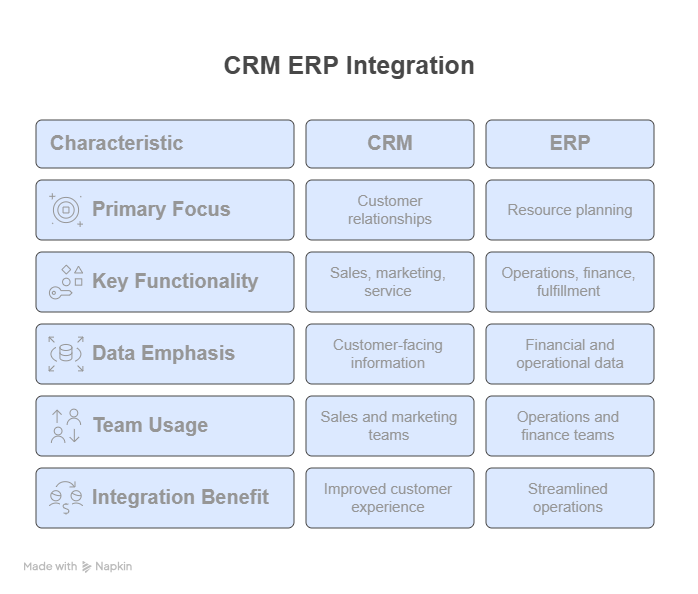
You are under a growing pressure to deliver more personalized customer experiences while keeping operations running smoothly. The key to meeting both demands is aligning your front-office (sales and customer service) with your back-office (operations, finance, and fulfillment). That is exactly what CRM ERP integration helps you achieve.
By integrating your Customer Relationship Management (CRM) and Enterprise Resource Planning (ERP) systems, you create a unified ecosystem where sales and operations can collaborate, share real-time data, and make smarter decisions. This not only boosts internal efficiency but also leads to happier customers and stronger revenue growth.
The following blog gives you an idea about how you can integrate your CRM and ERP to optimize your sales and business operations. Key benefits, challenges, and best practices of CRM ERP integrations are also discussed here.
What is CRM ERP Integration, and why is it needed?
CRM and ERP integration is the simple process of connecting the APIs of both systems for data synchronization and maintaining a transparent communication between both systems.
As per the recent research, ERP systems are used by more than 64% of mid-size to big organizations, while 91% of businesses with more than 11 employees use CRMs. Moreover, McKinsey & Company also highlighted the importance of CRM ERP integration, as research revealed that the revenue of companies has increased by 20% after integrating these systems. These statistics emphasize the need for CRM ERP integrations, and by using both systems, you can deliver a personalized customer experience without compromising operational efficiency. Hence, you cannot take full advantage of these systems until you have integrated the two.
Why CRM ERP Integration Is Essential for Sales and Operations Alignment?
Operations and sales teams frequently work independently, with operations teams managing logistics and sales teams closing deals. But significant inefficiencies may occur due to this lack of transparency between the systems. For instance,
- A salesperson could make unrealistic promises about delivery dates.
- Inaccurate forecasts in operations may lead to overstock or understock.
- Inconsistent customer experience, ultimately making them dissatisfied.
However, you can fill this gap by integrating CRM and ERP systems and providing sales and operations departments with access to shared real-time data to make informed decisions.
Sales Teams Benefit By:
- Viewing current inventory levels, pricing, and fulfilment schedules.
- Providing accurate quotes and delivery timelines to customers.
- Tracking order and payment status from a single dashboard.
Operations Teams Benefit By:
- Accessing sales forecasts to plan production and procurement.
- Streamlining the order-to-cash cycle with fewer manual steps.
- Reducing returns and fulfilment errors by using CRM data.
Key CRM ERP Integration Touchpoints and Use Cases
You can highlight the common field that your ERP and CRM systems have and make them integration touchpoints. However, some touchpoints are popular with CRM ERP integrations and are easier to integrate as well. Some of the common integration touchpoints are listed below:
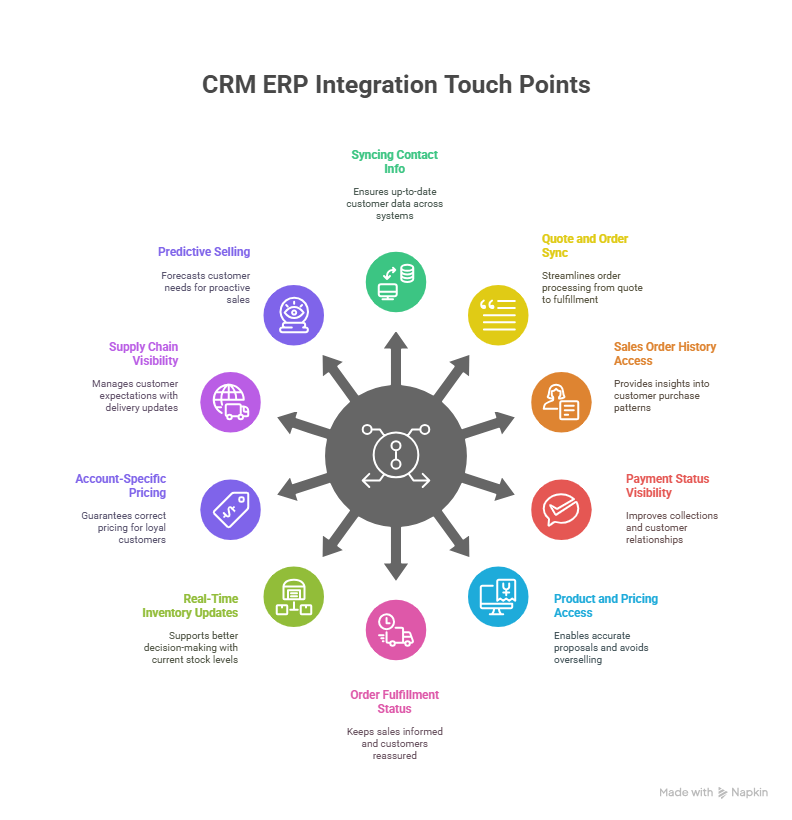
1. Syncing Contact and Account Information
ERP keeps track of shipping contacts, billing addresses, and terms of payment, whereas CRM stores customer-facing information such as contact names, email addresses, and lead status. Having both integrated guarantees that everyone has up-to-date data.
A wholesale distributor, for instance, utilizes SAP ERP for fulfilment and Salesforce integration for sales. SAP automatically updates when a customer changes their shipping address with a sales representative, guaranteeing that the next delivery is sent to the correct address without requiring manual team collaboration.
2. Quote and Order Synchronization
Although quotes are managed by sales representatives in the CRM, they are frequently created in ERP according to price criteria. Orders placed in the CRM also need to be fulfilled in the ERP. You can ensure smooth transitions through CRM ERP integration.
For instance, a B2B electronics company makes use of NetSuite and Zoho CRM. After a quote is created by a representative in CRM and accepted, it is synced to NetSuite to establish an order. The sales representative monitors its status while the operations team completes it, all without transferring systems or having the risk of duplicate data.
3. Access to Sales Order History
ERP systems contain all completed invoices and orders. Sales representatives can examine what a customer has purchased, how frequently, and the exact quantity through integrated CRM ERP.
Take an example of Microsoft Dynamics NAV ERP and HubSpot, used by a packaging manufacturer. Upon reviewing a client’s account, a representative can immediately spot a pattern of bi-monthly bulk orders for corrugated boxes. This data-driven insight improves customer satisfaction and enhances sales productivity by assisting them in forecasting reorder demands and making personalized subscription offers.
4. Payment Status Visibility
ERP manages accounts receivable, but sales teams often remain unaware of overdue invoices. CRM’s access to payment status improves collections and customer relationships.
For instance, a SaaS provider uses Salesforce and QuickBooks. A representative notices in Salesforce that a key client is 60 days overdue on payment. Before pitching an upsell, they coordinate with finance to resolve the balance, avoiding awkward conversations and reinforcing professionalism.
5. Product, Pricing, and Inventory Access
ERP systems manage real-time inventory and pricing. Integrating this data with CRM helps sales representatives build accurate proposals and avoid overselling.
To understand this, take an example of a medical equipment supplier that uses Dynamics CRM and Oracle ERP. A rep quoting for 15 hospital beds instantly sees that only 12 are in stock. They inform the customer of a partial shipment, propose alternatives, and close the deal without false promises or facing fulfilment delays.
6. Order and Fulfilment Status
Order fulfilment updates are frequently required by sales. Integrating shipping and fulfilment statuses from ERP into CRM keeps sales representatives informed and customers reassured.
An example would be a furniture company that uses SAP ERP and Zoho CRM to automatically update order status. In real time, a sales representative may provide tracking information and notify a customer that their item has been shipped without contacting logistics or switching apps.
7. Real-Time Inventory Updates
Sales must know about available inventory to guide customers. ERP has that information; integrating each system ensures the required information is visible within the CRM for better decision-making.
For example, a car parts dealer uses Salesforce and NetSuite. A rep checks Salesforce before quoting a garage and sees that a specific part is on backorder until next week. They offer a similar part in stock, securing the sale and setting realistic expectations.
8. Account-Specific Pricing and Discounts
ERP oversees discount tiers and negotiates prices. Syncing this with CRM guarantees that representatives use the right terms regularly.
For instance, Microsoft Dynamics is used by a chemical supplier for both CRM and ERP. When a representative quotes a loyal customer, their unique 10% volume discount is already included in the proposal, preventing mistakes and expediting approvals. As systems are integrated, finance sees the same pricing throughout invoicing, which ultimately prevents mischarges
9. Supply Chain and Shipment Dates
Shipment estimates data resides in ERP. Sales representatives need access to them to set delivery expectations and manage customer trust.
For example, an apparel brand uses Shopify integration and Oracle ERP. A sales representative sees that a fabric shipment from Turkey is delayed by 5 days due to customs. They immediately inform a retail customer expecting that SKU, preventing frustration and maintaining transparency.
10. Historical Purchase Trends and Predictive Selling
ERP stores invoice history; CRM uses it to forecast behavior and guide proactive selling. To understand this, take an example of an industrial equipment supplier that integrates Zoho CRM with Sage ERP. Based on a customer’s past purchases of safety gear every six months, the CRM automatically alerts the sales rep when it is time to reach out. This will result in a well-timed reorder, minimal downtime for the customer, and increased revenue without cold calls.
Choosing Between Custom APIs and Connectors for Your CRM ERP Integration
One of the most important decisions you will probably have to make when integrating your CRM and ERP systems to synchronize sales and operations is whether to use pre-built connectors or create your APIs. Custom APIs offer you complete control, but they also come with a high cost in terms of development time, technical resources, and continuous upkeep. They may also cause you to lag when you need to swiftly update or scale procedures.
An iPaaS solution such as Burq can help with that. Burq provides centralized monitoring, visual workflow builders, and pre-built connectors without requiring you to write complicated code. Orders, inventory, customer information instantly synchronized between your ERP and CRM.
With BURQ’s iPaaS, you can empower your teams to operate more productively, cut down integration time and expenses. iPaaS is the way to go if you want to integrate your CRM and ERP systems in a smarter and scalable manner.
Benefits of CRM ERP Integration
Your business is more likely to operate with agility, accuracy, and speed when you choose to integrate your CRM and ERP systems. With connected systems, operations, finance, and sales teams get access to the real-time data, which ultimately helps them in making data-driven decisions. Your organization can gain the following benefits from CRM ERP integration.
1. Eliminates Data Silos Across Departments
The system is exposed to data silos when CRM and ERP are operating separately. One of the greatest benefits of CRM ERP integration is the removal of data silos which enhances transparency between the systems. This helps teams to streamline collaboration and reduce dependency on manual updates.
2. Reduces Manual Errors and Duplicate Work
Manual data entry leads to costly mistakes such as mismatched invoices, outdated contact info, or incorrect orders. However, CRM ERP integration automates data entry and synchronization across systems, which ultimately enhances data accuracy, reduces effort, and saves time.
3. Improves Sales Efficiency and Responsiveness
Critical ERP information, including price, inventory, and payment status, is directly accessible to sales representatives from the CRM. This helps them build faster, more accurate quotes and respond to customer questions without delays, increasing both productivity and customer confidence.
4. Optimizes Order Fulfilment and Inventory Planning
Operations teams can better estimate demand and allocate resources with the use of integrated sales data. Accurate fulfilment from procurement to delivery lowers last-minute changes, delays, and stockouts.
5. Enhances the Customer Experience
Your staff can provide faster and more transparent customer service if they have real-time visibility into orders, shipments, and account status. This will lead to higher satisfaction and stronger long-term relationships with customers.
6. Supports Smarter Forecasting and Business Planning
Connected data from CRM ERP integration allows you to monitor financial trends, operational capacity, and pipeline performance in one location, resulting in more precise forecasting and strategic planning that promotes long-term success.
Challenges of CRM And ERP Integration and How to Solve Them
1. Data Inconsistency and Lack of Standardization
CRM and ERP systems have different formats for storing data. This might include product codes, IDs, customer names, and addresses. However, if the data standardization format is not in place, then the synchronization of data when systems are integrated can lead to errors, mismatches, and duplication. You can rectify this by cleaning and standardizing your data before CRM ERP integration.
2. Outdated or Dirty Data
As per the recent research, 91% of the data in CRM is either missing, incomplete, or incorrect. This dirty data can harm various aspects of your organization associated with operations and sales. Hence, before integrating CRM ERP, it is recommended to remove all inconsistencies and inaccuracies in the data.
3. Legacy Systems Without APIs
Your organization might have legacy systems, and this can create a problem if you opt for CRM ERP integration. This is because many outdated systems are not compatible with modern connectivity systems. In these cases, integration requires workarounds like database-level access or file-based transfers, which can be slow and error-prone. However, you can bridge this gap by using an iPaaS platform with legacy system connectors.
4. Limited Internal IT Resources
The integration of CRM and ERP systems often requires help from skilled IT staff, as this process is technically complex. Many companies, however, have limited IT staff and lack in-house technical expertise. To rectify this challenge, you can opt for a low-code IPaaS solution to integrate CRM and ERP, which will minimize your dependency on technical teams.
5. Lack of Proper Testing and Monitoring
Poor testing sometimes leads to integration difficulties after deployment. In the absence of edge case validation and sync error monitoring, minor problems can easily grow into larger ones. You should incorporate real-time monitoring and extensive testing into your deployment strategy to guarantee stability and long-term dependability.
Best Practices to Optimize your CRM ERP integrations
You can implement the following best practices to make your CRM ERP integration process smooth:
- Assign clear roles for managing integrated workflows both technically and operationally.
- Do not overload systems by syncing unnecessary data.
- Use bi-directional sync where it makes sense, for instance, allow inventory updates to flow back into CRM.
- Prioritize time-sensitive data, such as orders, stock, and shipping should update in real time.
- Establish error handling and alerts and set up automated notifications for failed syncs or data mismatches.
- Design integrations to support future tools and scalability.
Final Thoughts
The success of your organization depends on customer satisfaction, and since customer expectations are rising continuously, you need to become more responsible in managing your systems and removing data silos in sales and operations. CRM ERP integration allows you to remain competitive, responsive, and agile, and helps you to maximize customer satisfaction.
Whether you are a startup growing quickly or an organization updating outdated systems, investing in ERP CRM integration is a smart decision that benefits every team and department. Use Burq for your CRM ERP integration, and make this transition quicker, smarter, and more scalable.