


Advanced Controls in Integrations
Automatic Retry
When working with integrations, temporary failures such as API downtime, rate limits, or network instability are inevitable. To minimize disruption, BURQ provides a configurable retry mechanism that automatically re-attempts failed requests.

How it works:
- Automatic Retry – When a transport call fails, the system retries it based on your configured parameters.
- Retry Attempts – You can set how many times the system should retry (e.g., 3 attempts before marking as failed).
- Retry Interval – Define the wait time between retries (e.g., retry every 5 minutes). This helps you balance between responsiveness and avoiding provider throttling.
How you configure it:
- Go to Dataflows in your BURQ workspace.
- Open the desired Dataflow and navigate to Transport Filters.
- Enable Automatic Retry.
- Set your preferred retry count and retry interval.
Kill Switch
The Kill Switch is a protective control designed to prevent cascading failures across your integration landscape. If multiple errors occur in succession, instead of overwhelming downstream systems with faulty requests, you can temporarily stop the flow with one action.
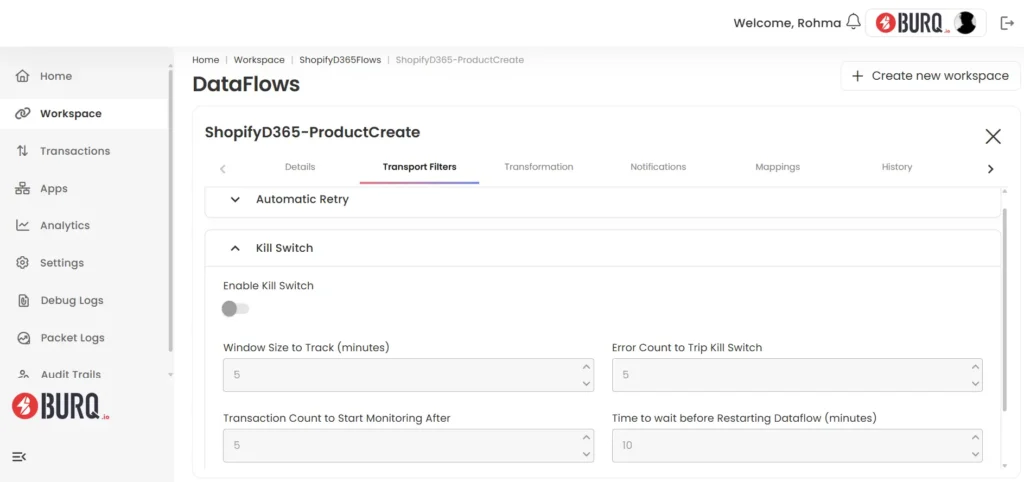
How it works:
- Error Threshold Trigger – When continuous failures are detected, the Kill Switch halts execution of that Dataflow.
- Isolation – Enabling the Kill Switch for one Dataflow does not affect other Dataflows or Workspaces. Each Dataflow operates independently.
- Manual Resume – Once you’ve identified and resolved the underlying issue (e.g., fixing invalid credentials, endpoint recovery), you can resume the flow manually from the same control panel.
- Production Safety – This is especially useful in live environments where uninterrupted, stable flow is critical, preventing one failure from snowballing into system-wide instability.
How you configure it:
- Go to Dataflows in your BURQ workspace.
- Select the specific Dataflow you want to secure.
- Navigate to Transport Filters
- Toggle Kill Switch on.
- Defines the rolling time window for monitoring errors (e.g., 5 minutes).
- Determines how many transactions must occur before monitoring begins.
- Also set the number of errors allowed within the tracking window before the Kill Switch is triggered.
- Defines how long the system should wait before attempting to automatically resume the Dataflow.
This feature ensures you maintain granular control, stopping only what’s problematic without impacting healthy workflows.