A few years ago, you only needed 2-3 tools to run your business, maybe a CRM, and ERP, and ERP, and your website’s backend. Things were manageable. But, slowly and gradually, your business is scaling, and now, you’re working with a dozen apps across departments: eCommerce platforms, marketing tools, analytics dashboards, customer portals, etc. These systems work great independently, but now you need to integrate them to avoid data silos and increase transparency for customer satisfaction and allow teams to work efficiently. This is where the problem of enterprise integration arises, because it’s not just about plugging system A into system B anymore. You need a setup that moves fast, scales effortlessly, and keeps your data flowing securely across every part of your business.
What you want is a system that just works quietly in the background so your teams can focus on more complex business problems, instead of managing middleware. So, if you’re unsure what features to look for in an enterprise integration platform for your business, then this blog is for you. Here we have analyzed various features and trends of enterprise integration that will help you in decision-making
What Is an Enterprise Integration Platform?
An enterprise integration platform is a solution that allows your systems, whether they live in the cloud or on-premises, to communicate and share data seamlessly.
Instead of having a spaghetti mess of one-off integrations (or worse, employees manually copying and pasting data), you get a centralized system that handles all the routing, translating, and data synchronization between systems.
This type of platform is often delivered as iPaaS (Integration Platform as a Service). That means it’s hosted in the cloud and scales as you grow. However, some vendors still offer hybrid or self-managed versions for industries with stricter compliance needs.
Why is this central “brain” so valuable? Because when data flows smoothly, operations follow, and when operations work, business moves faster. Having a unified integration layer reduces error-prone manual workflows, cuts down costs, enhances collaboration, and improves time to market for products or services.
Why Integration Matters More Than Ever in 2025
Your business probably didn’t start with this many systems. Over time, they accumulated. One team added a CRM. Another onboarded a data visualization tool. Someone needed Shopify. And then accounting wanted NetSuite.
Before long, you’ve got a tech stack that’s powerful but disconnected.
Here’s why that’s a problem now more than ever:
- Real-time expectations: Customer satisfaction decreases when there are delays and inconsistencies. Your internal teams need to meet the real-time customer expectations to sustain them.
- Too much manual work: Manually copying data between different applications is not only a waste of time but also increases the risk of human error in data handling.
- Compliance risk: Inaccurate data can create the risk of missed orders, incorrect customer information, and compliance risk.
- Growth bottlenecks: When you try to scale your business, it will become painful if you continue to rely on fragile, outdated manual workflows or point-to-point integrations.
Hence, the modern enterprise can no longer afford to view integration as an afterthought. Integration plays a strategic role in digital transformation. It powers customer 360 initiatives, data-driven decision-making, and agile operations.
An enterprise integration platform solves this by acting as a hub where everything connects, automates, and scales, without requiring you to rewrite your entire infrastructure.

What You Gain with a Good Integration Platform
You can gain the following benefits if you opt for an enterprise integration platform to connect your systems.
Operational Speed
Less time reconciling systems means faster execution, from quote to cash, from lead to customer, from issue to resolution. This directly affects time-sensitive industries such as retail, logistics, and healthcare.
Clearer Visibility
When systems are connected, you don’t need multiple reports to know what’s happening. You see everything in one intuitive dashboard. This promotes transparency across departments and accelerates analytics initiatives.
Scalable Infrastructure
A strong platform grows with your business. You don’t need to rip and replace as complexity increases. Instead, you expand horizontally with reusable integrations and vertically with new services.
Empowered Teams
Non-technical users can build and monitor their workflows, reducing reliance on IT and unblocking projects. Democratizing integration reduces backlogs, increases agility, and boosts morale.
Bottom line: the right platform becomes the invisible layer that holds your entire digital operation together.
Top Features to Look for in an Enterprise Integration Platform in 2025
Not all integration tools will serve your needs well. Some are too basic. Others are too rigid. Here’s what you should be prioritizing in 2025 if you want something that makes your integration secure, smarter, and scalable. Understanding the different types of integration platforms can help you make an informed decision.
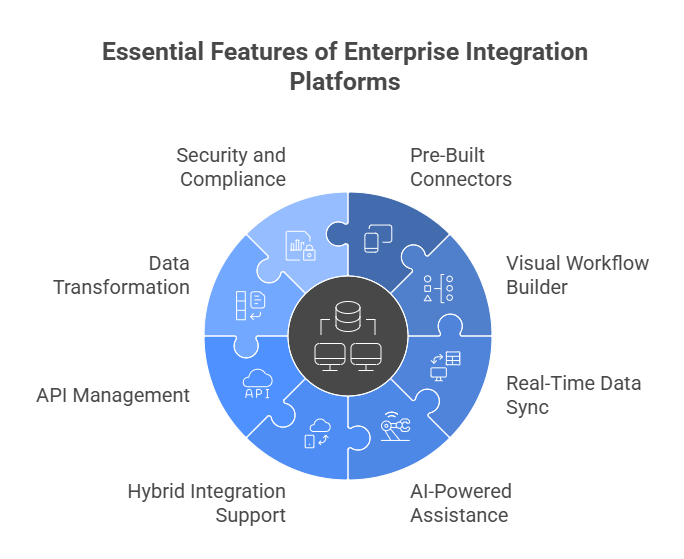
1. Pre-Built Connectors for Fast Deployment
A solid integration platform should offer pre-built connectors for hundreds (ideally thousands) of popular applications, for instance, Salesforce, SAP, NetSuite, HubSpot, Shopify, and so on.
Why this matters:
- Faster implementation
- Fewer bugs
- Lower engineering overhead
Modern enterprises switch tools quickly. You need plug-and-play flexibility. Some platforms like BURQ iPaaS offer pre-built connectors that span enterprise, mid-market, and modern SaaS ecosystems.
Pre-built connectors give you the ability to configure complex fields, bi-directional data flow, and pagination or batching for large data volumes. Additionally, connector maintenance and updates must be consistent and frequent, especially when app vendors release new APIs. Look for platforms that provide connector lifecycle management and changelog transparency.
Furthermore, it’s important to assess how the platform handles connector versioning and backward compatibility. Will a platform update break your integration? Can you test new versions in staging before going live? These questions are crucial for ensuring business continuity.
2. A Visual, Low-Code Workflow Builder
Most workflows don’t need a developer. A drag-and-drop interface allows business users to:
- Map fields visually between the source and target systems
- Add logic (e.g., “if this, then that” conditions)
- Chain together multiple steps across applications
- Test and simulate flows before pushing to production
Low-code interfaces reduce the backlog for engineering teams and increase responsiveness to internal process improvement requests. Some platforms now provide AI-generated workflow templates, version control within the builder, and collaboration tools to allow multiple stakeholders to design workflows in real-time.
A good low-code builder should also include visual debugging tools, data previews, and rollback options. For organizations with distributed teams, multi-language UI, and role-based access within the builder, enhance accessibility and governance.
3. Real-Time Data Sync and Event-Driven Architecture
Batch-based sync is no longer enough. Whether you’re handling ecommerce orders, support tickets, or inventory, real-time data flow matters.
Support for:
- Event-driven triggers (e.g., form submissions, file uploads)
- Webhooks for instant updates
- Message queues and pub/sub models
- Low-latency data processing pipelines
Real-time capabilities ensure systems stay in sync and reflect updates as they occur, not minutes or hours later. This is especially valuable for SLAs in financial services, logistics, and customer support.
Platforms that provide event replay, filtering, and transformation at the trigger level allow even more granular and intelligent automation. Also, look for integration with modern event brokers like Kafka, RabbitMQ, and Google Pub/Sub.
4. AI-Powered Assistance
AI in integration goes beyond field suggestions; it improves productivity across the entire lifecycle.
Features to expect:
- Auto-generation of mapping rules based on historical patterns
- Workflow health diagnostics
- Predictive failure alerts based on usage trends
- Auto-recommendation of connector settings
AI can also aid in anomaly detection, suggesting enhancements based on data patterns and integration frequency. The goal is not to remove control from users, but to speed up delivery and reduce risk.
Advanced platforms might even leverage AI for integration documentation, test case generation, and cost estimation.
5. Hybrid Integration Support
Cloud-native is the norm, but legacy systems are still everywhere. Platforms should bridge both worlds seamlessly.
Must-have hybrid features:
- Secure tunneling via VPN, IP whitelisting, or SSH
- Lightweight local agents that push/pull data from on-prem systems
- Direct access to file systems, FTP/SFTP, and SQL/Oracle DBs
Hybrid capabilities are essential for regulated industries or businesses undergoing gradual digital transformation. Modern platforms often offer dynamic routing based on where the data lives, allowing workflows to span on-prem and cloud environments simultaneously.
Also, look for support for cloud file storage (e.g., S3, Google Cloud Storage) and enterprise document management systems (e.g., SharePoint, Box).
6. API Management and Orchestration
Beyond point-and-click integrations, many enterprises build internal or partner-facing APIs.
Top API management capabilities:
- Publish APIs directly from workflows
- Auto-generate OpenAPI/Swagger documentation
- Secure access via API keys, OAuth2, SAML
- Apply rate limits, IP filtering, and audit logging
This lets you use your integration platform as a mini-API gateway. For instance, you can expose an internal procurement workflow to a vendor portal using RESTful endpoints without needing a separate API product.
Platforms should also support the orchestration of multiple APIs in one flow and include monitoring tools for uptime and response latency.
7. Data Transformation and Field Mapping
No two systems speak the same data language. The best platforms provide robust, intuitive tools to transform data.
Must-have capabilities:
- Expression builder for calculated fields
- Support for structured (JSON, XML) and unstructured data
- Regex and pattern matching
- Unit conversion, currency formatting, and localization
Transformation should happen visually, with a real-time preview of source and target values. Built-in libraries for common use cases (e.g., flattening nested arrays or date formatting) accelerate development.
Conditional mapping based on business logic, like mapping a CRM “Lead” to a Marketing “Contact” only if a certain field is present, helps avoid data loss and ensures contextual integrity.
8. Built-In Security and Compliance Tools
Security is the most important aspect when it comes to enterprise integration.
Key features include:
- Role-based access control with SSO integration
- Encrypted vaults for storing secrets and tokens
- IP-based access rules and endpoint validation
- Immutable logs for audit trail and compliance
Look for certifications and compliance attestations: SOC 2 Type II, ISO 27001, HIPAA, GDPR. Platforms that allow tenant isolation, regional hosting (for data sovereignty), and data residency settings will better serve global businesses.
Modern platforms should integrate with SIEMs, IAM tools, and DLP systems to provide a holistic security posture.
9. Scalable Infrastructure
Integration workloads can spike rapidly, especially during sales events, regulatory deadlines, or data migrations.
Ensure your platform offers:
- Auto-scaling infrastructure with no downtime
- Geo-distributed processing nodes
- Load testing capabilities
- Predictive cost modelling
Scalability isn’t just about performance; it’s also about cost optimization. Platforms that provide real-time usage dashboards, per-flow analytics, and tiered billing models help control spend as your integration landscape evolves.
Some vendors offer dedicated runtime environments, reserved capacity, or bring-your-own-infrastructure options for maximum control.
10. Smart Error Handling and Retry Logic
Enterprise integration platform offers smart error handling and retry logic.
A reliable platform should include:
- Retry queues with customizable intervals
- Conditional error routing (e.g., send failed invoices to a Slack channel)
- Dead-letter queues for review and reprocessing
- Visual error logs with stack traces
Some platforms also offer incident correlation, automatically identifying which failures are related and suggesting a root cause. Integration with monitoring tools like Datadog, New Relic, or Grafana can streamline DevOps collaboration.
Error handling workflows should be testable and auditable, enabling you to meet internal SLAs and external compliance requirements without firefighting each time something breaks.
Failures are inevitable. What matters is how gracefully the platform recovers.
Critical features include:
- Retry policies with exponential backoff
- Dead-letter queues
- Alerts via Slack or email
- Logs and traceability dashboards
Smart platforms go further with automated incident resolution, root cause analysis, and user-friendly dashboards. This saves your team hours of investigation and restores workflows faster.
Emerging Trends in Enterprise Integration
Composable Integration
Companies are moving from monolithic workflows to small, reusable micro-integrations. It’s faster, modular, and easier to maintain. This trend is aligned with microservices architecture and supports faster innovation cycles.
IntegrationOps
Think DevOps, but for integration. This means version control, testing, CI/CD pipelines, and rollback support, bringing discipline to integration workflows. Tools that support IntegrationOps reduce shadow IT and enable collaboration.
AI-Led Monitoring
Platforms are getting smarter, spotting anomalies, suggesting fixes, and even auto-repairing broken workflows. Predictive analytics is also being used to forecast failures and optimize throughput.
Edge and IoT Integration
More data now comes from physical devices, sensors, kiosks, and machines. Integration platforms must now handle edge processing and sync. This includes support for MQTT, lightweight containers, and asynchronous queues.
2025 Integration Platforms Comparison
| Platform | Best For | Workflow Builder | Real-Time Sync | Hybrid Support | Key Differentiator |
| BURQ.io | Mid-size to large enterprises | Full-featured no-code | Fully supported | Strong on-prem & cloud support | Real-time EDI, AI-driven automation, deep mapping |
| Prismatic | SaaS vendors needing embedded flows | Limited public info | Not specified | Not specified | Embeddable integration for B2B SaaS apps |
| Tray.io | Business automation teams | Easy-to-use visual builder | Partial real-time support | Primarily cloud-focused | Clean UI, good for workflow branching |
| Frends | Large enterprises and the public sector | Customizable low code | Fully supported | Enterprise-grade hybrid support | Cost-effective, strong control over orchestration |
| Patchworks | Retail and e-commerce brands | Basic no-code builder | Limited capabilities | Designed mostly for SaaS tools | Easy to onboard, tailored for retail platforms |
| CloudWorkflow | Not publicly specified | No clear details available | Real-time support unclear | On-prem capabilities unclear | Insufficient public data for evaluation |
Final Thoughts
Integration isn’t just something running in the background anymore. For a lot of businesses, it’s now a make-or-break part of how things get done. When systems don’t talk to each other then it leads to slower processes, frustrated teams, and missed opportunities. The right integration platform should help your teams work faster, avoid repetitive tasks, and give customers a smoother experience overall. But here’s the thing: checking off a feature list isn’t enough in 2025. You’ve got to ask tougher questions. Can non-technical folks figure it out without looping in IT every time? Will it still make sense for your business in three years? And does it tick all the right boxes on security and compliance? If it can’t do all that, it’s just another tool, not a solution.
BURQ.io is designed with all of this in mind, built to grow with you, simple enough for any team to use, and powerful enough to handle serious complexity. See how BURQ.io fits your business.
FAQs
What exactly does an enterprise integration platform do?
It basically helps all your business systems talk to each other. Instead of manually moving data between apps like your CRM, ERP, or marketing tools, the platform automates it for you. It makes things faster, less error-prone, and easier to manage as your company grows.
Why is integration such a big deal now?
Because companies are using more tools than ever. If those tools don’t sync properly, you end up with teams working in silos and wasting time fixing broken processes. In 2025, smooth integrations aren’t just nice to have, they’re a must if you want things to run efficiently.
What are some features worth paying attention to in a modern integration platform?
You should look for real-time syncing, drag-and-drop workflow builders, support for cloud and on-prem apps, security certifications, and smart features like AI-driven field mapping. These can save your team hours of setup and maintenance work.
Can I connect old-school on-premise systems with a cloud integration tool?
Yes, a good one should handle both. Many platforms now offer hybrid support, things like secure agents or tunneling to help you link on-prem systems without compromising on security or speed.
How does AI actually help in integrations?
It speeds things up. Think of AI suggesting how to connect fields between systems, or flagging errors before they cause problems. It’s like having a smart assistant that helps you build better workflows without second-guessing every step.
Will this cut down the amount of manual work my team does?
Absolutely. That’s kind of the whole point. Once your systems are connected properly, data flows automatically. Your team won’t have to update spreadsheets or chase down missing info anymore, it just works in the background.