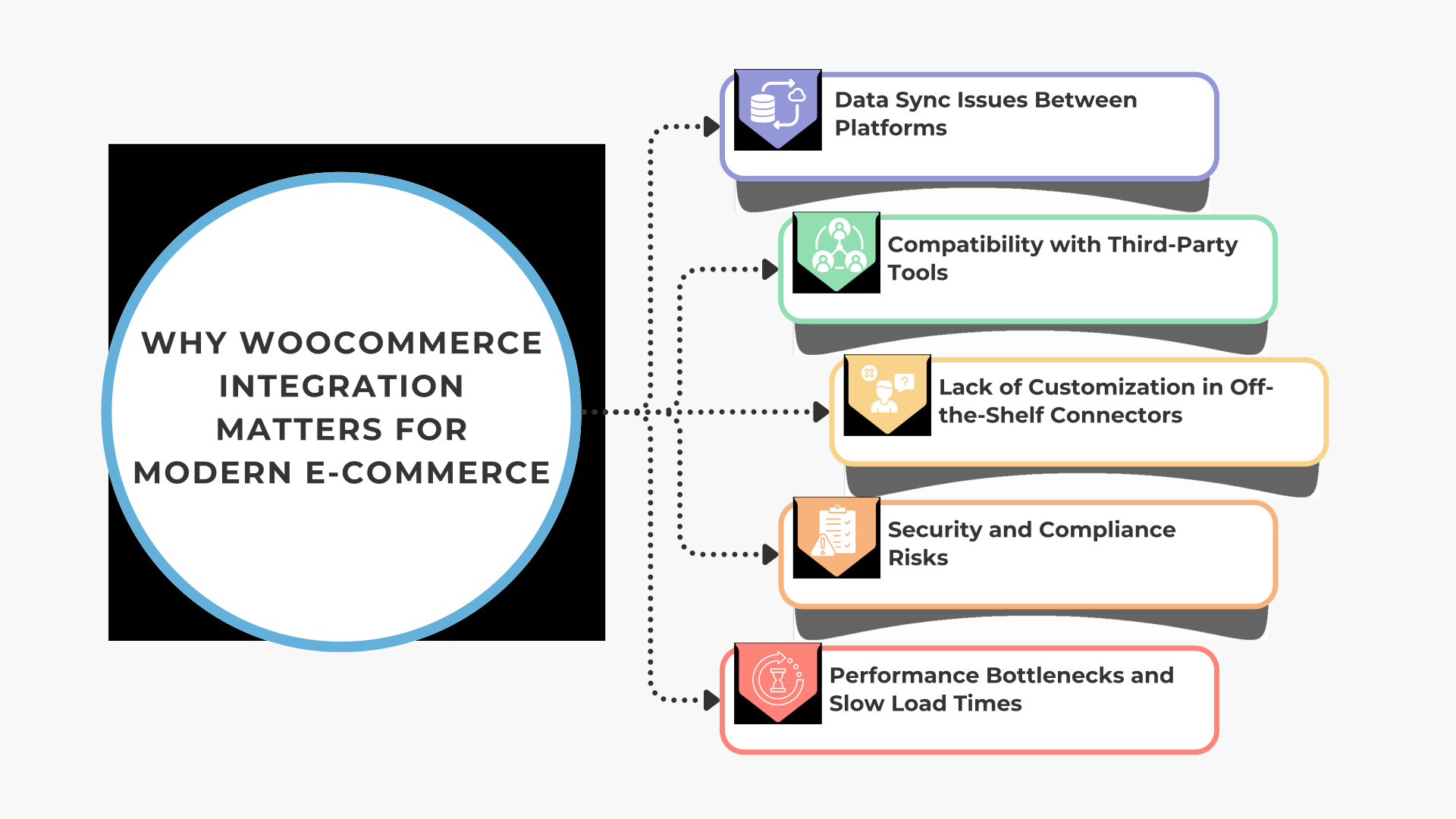
Why WooCommerce Integration Matters for Modern E-Commerce
 Today, more than 81% of the total population in the United States is shopping online. If you run an online store in 2025, you must know that your customers expect a smooth, easy, and flawless shopping experience. Without putting in place powerful integrations, this is hard to pull off.
When done right, WooCommerce integration does the following:
- Streamlines order management, inventory tracking, and customer experience
By having the right integrations in place, you will never oversell or miss a customer order. This happens because everything is updated automatically from product availability to fulfillment of the order.
- Reduces manual work by connecting WooCommerce with ERP, CRM, and marketing tools
You will not have to spend hours working on spreadsheet imports or manual syncing. WooCommerce automation frees up your time, and you can think about your growth initiatives instead of operations.
Challenge 1: Data Sync Issues Between Platforms
Data sync issues top the list when it comes to the most common challenges in WooCommerce integration. They build up quietly and then destroy your backend.
Symptoms
There are delays in order updates, inventory mismatches, and customer data is often inconsistent. These issues usually occur when systems do not communicate in real-time. Thus leading to operational inefficiencies.
You might also notice customers receiving incorrect order status or stock being oversold.
Solutions
- Use middleware or iPaaS solutions to sync data in real-time
A centralized integration layer helps you connect WooCommerce easily with your other platforms. This keeps all data, such as order, inventory, and customer, up-to-date across all systems.
- Implement API-based integration rather than manual CSV imports
APIs provide live and bidirectional data sync. Thus, eliminating errors and improving speed.
Unlike CSV files, APIs rid you of the need for manual intervention or frequent uploads.
Using a powerful platform like BURQ iPaaS can help you achieve a reliable, real-time WooCommerce API integration that works smoothly in the background.
Challenge 2: Compatibility with Third-Party Tools
Integrating WooCommerce with external tools sounds easy, until your plugins start clashing.
Symptoms
Plugins or tools are not working well together.
Conflicts often arise when plugins are not updated or fail to follow WooCommerce standards. This can result in errors, slowdowns, or worse in even a completely broken storefront.
Solutions
Check the compatibility of the plugin before integration
You must review the changelog, test in staging environments, and go through the developer documentation.
This minimizes the risk of integration clashes and prevents unplanned outages.
Work with certified developers or solution partners
Professionals with WooCommerce expertise can proactively identify the bottlenecks.
They can help you build a stable environment by following the best practices and tested frameworks.
If you are integrating with WooCommerce third-party plugins or trying WooCommerce CRM integration, then working with experts will save you time and money.
Challenge 3: Lack of Customization in Off-the-Shelf Connectors
Generic connectors are fine until a specific need arises, like syncing a loyalty program with your CRM or automating multi-location shipping.
Symptoms
Failure to meet unique business requirements
Prebuilt connectors often miss niche features that are designed to meet your specific operational needs.
You can find it difficult to automate custom logic like tiered pricing or multi-warehouse routing.
Solutions
Choose customizable integration platforms
You must choose tools that offer flexibility for building workflows and handling unique business logic. This will let your store change and grow without requiring a new platform or a significant overhaul.
Build tailored workflows with Make.com or Zapier.
These platforms help you to devise specific actions and triggers across applications.
You can easily automate tasks like customer segmentation or custom email flows.
This kind of WooCommerce workflow automation makes your journey to scale a breeze. It is where custom WooCommerce integrations outshine.
Challenge 4: Security and Compliance Risks
Security becomes a foremost concern when you connect customer and payment data across platforms. It is something that must be taken care of as a top priority.
Symptoms
Data breaches, lack of GDPR compliance, and unsecured APIs
Any security loophole can expose sensitive customer and order data to attackers. This can result in hefty legal fines, loss of trust, and damage to the brand reputation.
Solutions
Implement secure APIs with token-based authentication
Tokenization reduces risks by providing limited and encrypted access. It also prevents unauthorized access even if credentials are exposed.
Ensure integration complies with local data regulations
Follow rules like GDPR or CCPA according to your region and customer base.
Regular audits and privacy policies are mandatory to stay legally safe.
So if WooCommerce secure integration is your priority, then it is now time to consider WooCommerce data security and WooCommerce GDPR compliance. Platforms like BURQ iPaaS are already built with those needs in mind.
Challenge 5: Performance Bottlenecks and Slow Load Times
According to BigCommerce, almost 70% of the shopping carts are abandoned, and one of the main factors is slow load time. You have set up integrations, but now your site drags every time there is a sale. That is a tell-tale sign of poor architecture.
Symptoms
Site slowdowns during peak sales or high API usage
When too many requests hit the server, it becomes overwhelmed, as it cannot handle all of them; hence, it can crash or become unresponsive. This leads to cart abandonment and poor customer experiences.
Solutions
Use asynchronous processing and queue-based architecture
Instead of real-time strain, background processing spreads out the load. This keeps your frontend running smoothly, even during large sync jobs.
Monitor integration performance with tools like New Relic or Sentry
These tools alert you about any API failures, server issues, or unusual surges in the load.
Real-time dashboards help your technical team take action proactively and control them before they escalate.
You must focus on WooCommerce performance optimization from the start. If you are already facing WooCommerce load time issues, then consider shifting to an architecture that supports scale.
How to Choose the Right WooCommerce Integration Partner
If you have come this far, you must already know integration is not something you want to try with trial and error.
Here is what to look for:
Look for experience in your domain (retail, B2B, etc.)
A partner who understands your business model and unique needs can recommend the best solutions.
Whether you are B2B or DTC, that context matters a lot.
Ensure they offer scalable, secure, and real-time solutions
The platform should grow and scale up with you and stay strong under pressure. That includes real-time sync, security protocols, and high uptime.
Ask for case studies and post-integration support
. If you want to see proof that they have solved similar challenges. Post-launch support is just as important as the initial setup.
The ideal WooCommerce consultants not only fix problems, in fact they help prevent them. You must search for a provider that offers complete WooCommerce integration services that match your long-term goals.
Final Thoughts
Taking the common challenges in WooCommerce integration head-on and proactively can save you from operational issues that might arise later on.
This includes syncing your inventory in real-time, avoiding plugin conflicts, and improving site speed, These challenges can be easily taken care of if you follow the right approach.
From what we have discussed in this article, data sync problems, third-party plugin clashes, limited customization, security concerns, and performance slowdowns, every issue has a perfect solution.
The power move here is to act early, work closely with experts, and choose a flexible and scalable solution that will support your growth journey.
If you are in search of a partner that understands these challenges and provides a future-proof solution, then you must explore BURQ iPaaS.
It has support for WooCommerce CRM integration, POS systems, APIs, and much more. It is built for e-commerce businesses who are ready and eager to scale.
So, in the end, we can say that whether you are integrating WooCommerce with an ERP, CRM, or any custom tool, the right approach and partner can save you from all the frustration and boost business performance.
Integration is not a simple tech decision of the present rat; it is a growth decision for your future!