Have you ever felt like every time your organization accelerates its speed to market with a new SaaS application, you inherit a new headache of data fragmentation? As a CIO, you are tasked with empowering business agility while maintaining a resilient, secure, and unified technological architecture. Yet, the rapid adoption of best-of-breed software leads to systemic complexity.
Enterprises today leverage an average of 897 applications, but a staggering analysis reveals that only 29% of those critical applications are adequately integrated. This massive integration gap introduces long-term technical debt, creates data silos, and, critically, bottlenecks your most strategic initiatives. In fact, data integration challenges are cited by 37% of enterprises as the top limitation for scaling AI initiatives, outpacing concerns about computing power or talent gaps.
The core issue facing your leadership team is deciding where to invest: in tactical, localized automation tools, or in the strategic, enterprise-grade integration foundation required to truly scale. In this blog, we will provide a comprehensive comparison to help you determine the optimal solution for your long-term strategy, focusing specifically on automation platform vs iPaaS capabilities.
What is an Automation Platform?
An Automation Platform often categorized as a Workflow Automation Platform (WAP) is a set of tools primarily designed to automate routine, repetitive tasks. These platforms excel at eliminating manual steps and expediting localized processes.
The central focus of a basic automation platform is process efficiency and task sequencing. These solutions are generally low-code or no-code and are often utilized by business professionals to solve immediate inefficiencies within their specific line of business. For instance, a basic platform might automate sending an email notification when a specific status changes in a CRM system.
When we talk about the distinction between iPaaS vs automation tools, it is crucial to recognize that many of these tools are designed to work within or between a small number of systems. While they provide quick wins, they possess limited data integration functionality and may place practical limits on data volume, concurrent flows, and API calls. Furthermore, if you are relying on a basic automation tools vs integration platform to connect legacy or non-API systems, you may be using RPA, which is often reliant on mimicking human actions via “screenscraping” the User Interface (UI). This reliance creates significant long-term architectural fragility.
What is Enterprise-Grade iPaaS?
Enterprise-Grade Integration Platform as a Service is a comprehensive suite of cloud services dedicated to enabling the development, execution, and governance of integration flows connecting any combination of on-premises and cloud-based applications, data, and processes.
Unlike basic automation, iPaaS is the strategic foundation, the data backbone that ensures reliable, secure, and consistent data exchange across your entire ecosystem. It provides the necessary architecture for smooth data communication, high-volume synchronization, and complex data transformation across diverse environments.
This platform is architected for large-scale operations and is typically utilized by IT departments, developers, and integration specialists to maintain data consistency and streamline enterprise data management. Its core characteristics include:
- Cloud-Native Architecture: Designed for elasticity and scalability in hybrid or multi-cloud environments.
- Unified Management: Provides centralized monitoring, governance, and full lifecycle management.
- Prebuilt Connectors: Offers templates, prebuilt connectors, and business logic to accelerate implementation.
Seeking the best iPaaS for enterprises means looking for a solution built specifically to manage complex, hybrid integration scenarios involving large data volumes, ensuring a scalable and resilient operational infrastructure that can grow alongside your business. These platforms provide the necessary iPaaS solutions for large businesses to transition from tactical automation to strategic digital transformation.
Understanding the Difference: Automation Platform vs Enterprise Grade iPaaS
The strategic value of a platform is determined not by its immediate ease of use, but by its architectural resilience, long-term governance capabilities, and ability to handle enterprise scale. The decision between an enterprise integration platform comparison reveals critical differences that impact your Total Cost of Ownership (TCO) and risk profile.
Below are seven key differences defining the difference between iPaaS and automation platforms:
1. Architectural Approach
The choice between API-First and surface-scraping methods determines the long-term durability and maintenance burden of your integration landscape. Enterprise iPaaS is designed for stability, relying on an API-first approach that connects with applications via stable, vendor-managed APIs. This dramatically reduces maintenance burdens because the integrations do not break when the application’s UI changes. Conversely, basic Automation Platforms, particularly those relying on Robotic Process Automation (RPA), are inherently fragile. Automation platform uses methods like screenscraping the User Interface (UI) or proprietary scripts to mimic human actions. This design means that if the target application’s UI changes, the underlying RPA process will break, resulting in continuous, unscheduled IT maintenance costs and escalating technical debt.
2. Scalability and Data Volume
Basic automation platforms frequently encounter scalability issues when applied to complex enterprise needs. Automation Platforms often have practical limits on concurrent data flows, API calls, and complexity, making them unsuitable for mission-critical, high-volume processes. Furthermore, efforts to scale Workload Automation (WLA) solutions are often constrained by underlying dependencies on outdated infrastructure and legacy systems. Whereas, enterprise iPaaS is designed for elastic scalability. It manages complex, multi-system integration scenarios involving large data volumes, event streaming, and real-time synchronization, ensuring the platform scales reliably as your business grows.
3. Governance and Security
For large, regulated enterprises, security cannot be an afterthought; it must be a feature. The iPaaS security and compliance vs automation platforms debate reveals a stark difference in risk profiles. Automation Platforms often lack centralized dashboards and audit management functionality, limiting IT visibility and support. RPA tools, in particular, may necessitate hard-coding credentials into scripts, creating a serious security vulnerability and high Shadow IT risk.
Enterprise iPaaS provides enterprise-grade security by design, including centralized authentication (OAuth, Active Directory), Role-Based Access Control (RBAC), encryption for data at rest and in transit, and advanced API logging capabilities. The unified management and full audit trails are non-negotiable for proving compliance status during regulatory audits.
4. Focus on Data Complexity and Integration Scope
The distinction between iPaaS vs workflow automation centers on the level of complexity and scope. Workflow Automation handles simple, routine tasks, often contained within a few connected systems. It focuses on managing, executing, and automating business activities based on predefined sequences. Whereas, iPaaS is designed to manage complex, multi-system synchronization across a hybrid IT environment (cloud and on-premises). It provides the infrastructure needed to solve deep integration challenges in large enterprises, such as reconciling data across CRM, ERP, and Supply Chain Management systems simultaneously.
5. Fault Tolerance and Reliability
For mission-critical processes, resilience is paramount. iPaaS solutions are built with sophisticated reliability features that are prohibitively complex to custom-code into basic automation scripts. iPaaS inherently includes fault tolerance mechanisms like automatic retries to quarantine and analyze failed messages, and fallback logic to guarantee delivery and prevent data loss. On the other hand, automation platforms often rely on developers manually defining monitoring and retries, offering less visibility and relying on reactive troubleshooting.
6. User and IT Engagement
Advanced iPaaS solutions provide a centralized platform that caters to both technical and non-technical users. This architectural feature is essential for strategic IT governance. Enterprise iPaaS provides a single, centralized environment that empowers the “Citizen Integrator” with user-friendly low-code tools while ensuring IT teams retain centralized governance, monitoring, and security control. Whereas, automation platforms are fast and easy for business users to implement, but visibility and error handling are often restricted to individual users, preventing centralized IT support.
7. Total Cost of Ownership (TCO) Profile
While basic automation platforms might have lower initial licensing costs, they often accrue higher long-term TCO due to hidden maintenance costs.
- Automation TCO Risk: Fragility from non-API dependencies requires continuous, unscheduled staff time for monitoring and updating broken scripts, a significant contributor to long-term technical debt.
- iPaaS TCO Advantage: By using API-first, configuration-based approaches, iPaaS minimizes reliance on expensive, specialized developer skills and strategically shifts operational expenditure (OpEx) away from continuous maintenance toward strategic development.
| Criteria | Automation Platform | Enterprise-Grade iPaaS | Strategic Implication for CIO |
| Primary Focus | Task automation, process efficiency, individual workflows (within or few systems). | Data communication, cross-system synchronization, hybrid connectivity (enterprise backbone) | Determines whether the solution solves isolated inefficiencies or systemic data silos. |
| Architectural Approach | UI-scraping, proprietary scripts, visual builders; inherently fragile on change. | API-First, standardized, resilient, cloud-native architecture. | Direct impact on technical debt and long-term maintenance overhead. |
| User Base & Governance | Business users (Citizen Integrators); decentralized control; high Shadow IT risk. | IT/Developers (Pro Code) and LOB (Low Code); centralized governance (RBAC, Audit Log). | Crucial for maintaining security and organizational consistency across integrations. |
| Data Volume & Complexity | Handles routine, simpler tasks; limited by concurrency and transformation complexity. | Designed for large data volumes, event streaming, real-time sync, and complex transformation. | Determines ability to scale AI/ML initiatives and support real-time customer experience. |
| Fault Tolerance | Often manual or limited to simple retries; poor visibility. | Built-in features: Kill switch, automatic retries, guaranteed delivery. | Defines business continuity and reliability for mission-critical processes. |
Which is Best for Your Business: Automation Platform vs Enterprise Grade iPaaS?
The decision is not about choosing a “better” tool universally, but about aligning the tool with the strategic requirements of the task. The question of when to use iPaaS instead of automation tools depends entirely on the criticality, volume, and scope of your integration needs.
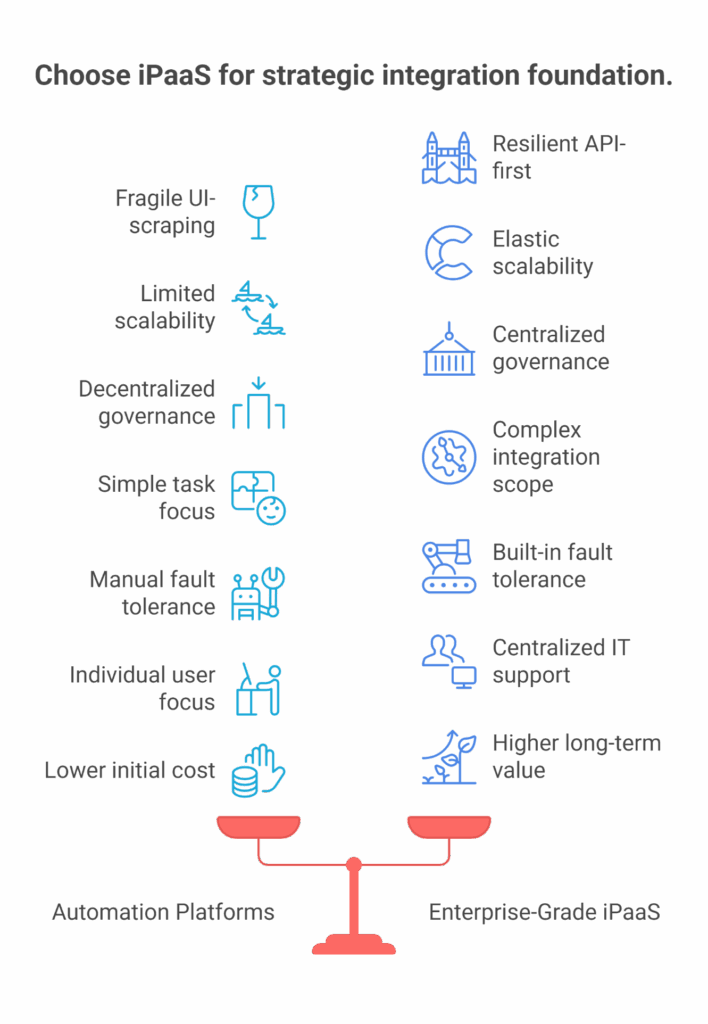
Choose Enterprise-Grade iPaaS when:
- You face systemic data silos and fragmentation. The core problem is the communication and synchronization of data across multiple mission-critical systems (ERP, CRM, Finance, SCM).
- You require high volume, real-time, or event-driven data flows. The solution must handle massive transactional loads and guarantee delivery without performance bottlenecks.
- The solution demands unified governance, security, and compliance. You need centralized control over authentication (RBAC), full auditability, and adherence to regulations like GDPR or HIPAA.
- You need to support a complex, hybrid environment. The solution must seamlessly connect modern cloud applications with existing on-premises or legacy systems. This is the mandate of enterprise-grade integration vs no-code automation.
Choose Automation Platforms when:
- You need tactical process efficiency. The goal is localized task sequencing or the elimination of manual, repetitive steps within a confined business unit.
- The process does not involve high data volume or synchronous, cross-system data synchronization.
- You need a quick, temporary solution for a non-critical workflow that is highly unlikely to impact the core financial or operational integrity of the business.
For large enterprises, the architecture should be iPaaS as the foundation, with automation tools as the execution layer. iPaaS builds the resilient, secure data pipelines, and automation tools leverage those trustworthy data streams to execute process workflows efficiently. Confusing these two roles, using a basic automation tool as your primary integration backbone will inevitably lead to unmanageable technical debt and architectural failure down the line.
Conclusion: Strategic Mandate for the Modern Enterprise
Enterprise-Grade iPaaS provides the strategic solution. Its API-first design, built-in fault tolerance, and centralized security transform integration from a back-end technical task into a core enabler of business agility. This approach is the only way to achieve true, sustainable agility while minimizing long-term TCO.
For those wrestling with the complexity of managing large-scale integration while harnessing powerful, scalable cloud services, BURQ Enterprise is the best choice. It is designed specifically to simplify the operation and management of complex integration flows while leveraging an enterprise-grade backend like Azure Logic Apps. It provides necessary governance features such as built-in reliability, full audit trails, and simplified management via a unified user interface.
Take the next step in your digital transformation strategy: Explore how Burq iPaaS can secure and accelerate your enterprise integration efforts today.
FAQs
If we already use automation tools like Zapier or Make, why would we need an iPaaS?
No-code automation tools are ideal for quick, standalone workflows but struggle with scale, governance, and large data volumes. An iPaaS, on the other hand, enables consistent, secure, and high-volume integrations across multiple systems, something basic automation tools can’t manage efficiently.
Can small teams without a large IT department successfully implement an enterprise-grade iPaaS?
Yes, but careful planning is essential. iPaaS platforms often offer low-code interfaces, yet they still require ongoing governance, connector management, and security oversight to avoid long-term maintenance and cost challenges.
What’s the real difference between workflow automation platforms and iPaaS?
Workflow automation focuses on automating repetitive tasks within one or a few systems — like notifications or approvals. iPaaS is designed for complex data synchronization, hybrid connectivity, and large-scale integrations across multiple cloud and on-premises environments.
What are the risks of using RPA or UI-based automation instead of an API-first iPaaS?
UI-based automation and RPA solutions often break whenever the target system’s interface changes, resulting in frequent fixes and downtime. API-first iPaaS platforms eliminate this fragility by connecting applications through stable, vendor-supported APIs, ensuring long-term reliability.
How do we know if our integration needs truly require an enterprise iPaaS?
If your processes involve multiple systems, large data volumes, real-time flows, or regulatory compliance, you likely need an iPaaS. For smaller, localized tasks that don’t impact critical operations, a simple automation tool may be sufficient.
Is an automation platform cheaper than an iPaaS in the long run?
Automation tools seem cost-effective initially but can become expensive due to hidden maintenance, scaling limits, and data errors. An enterprise iPaaS may have higher upfront costs but reduces long-term expenses by improving stability, governance, and scalability.